





A woman studying at her desk with a laptop and a notebook
Yallapp Studio · The premium academy

Twelve days in a row

Sara learns before work, on the way, at lunch and after dinner, a few minutes at a time. Her academy's app keeps her place, counts her minutes and tells her when class starts. This is one of her days, from the first code of the morning to the last lesson at night.

Real screen from the demoSara Yılmaz is learning Arabic calligraphy with Leila Haddad and, by tonight, UX design with Deniz Kaya; at 19:30 she has a live class on content marketing. Ufuq Academy is the premium academy template's demo, and every screen below is the real app. The demo's lessons are written ones; the video player you see is the one an academy with video lessons gets.

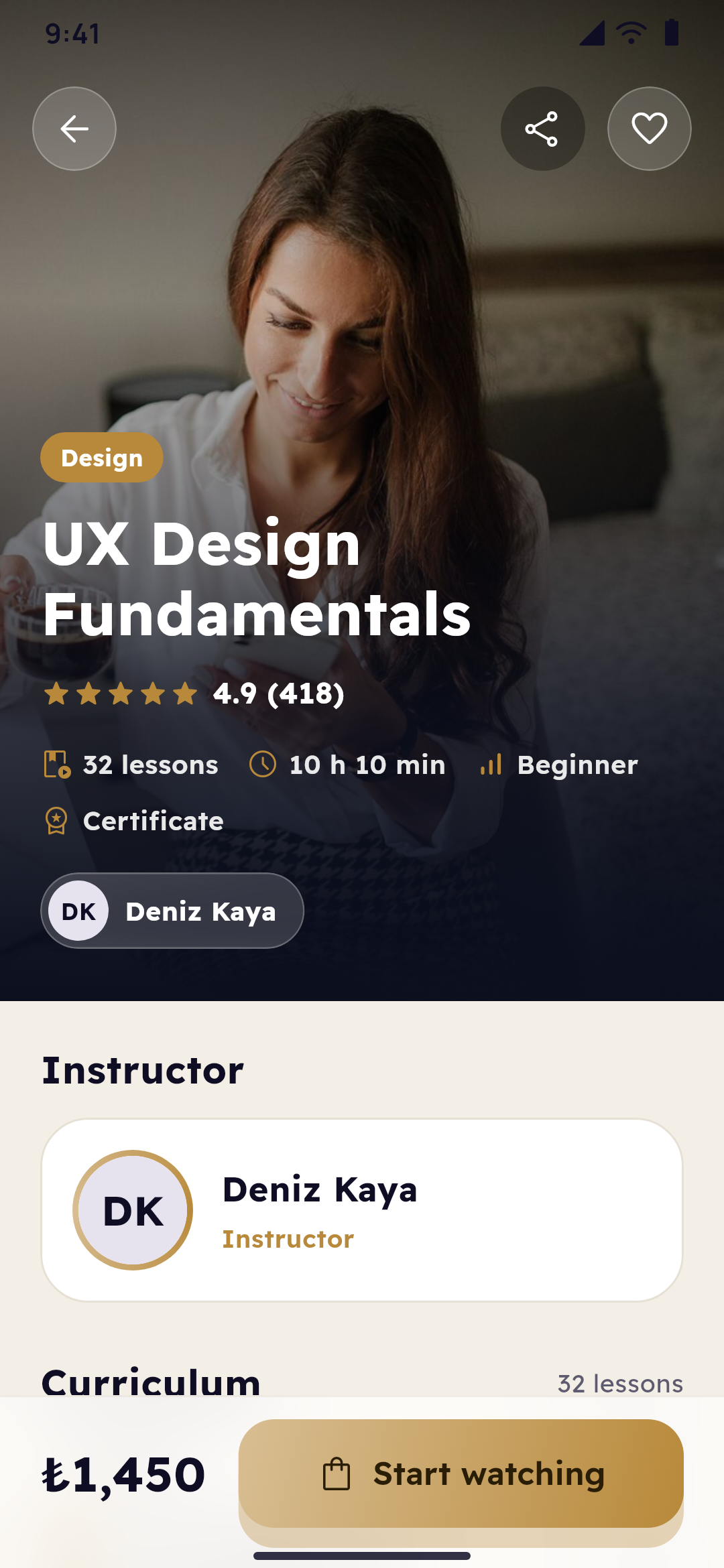
A course's page: its subject and certificate on a tall cover, its teacher, the curriculum as chips and Join now in gold
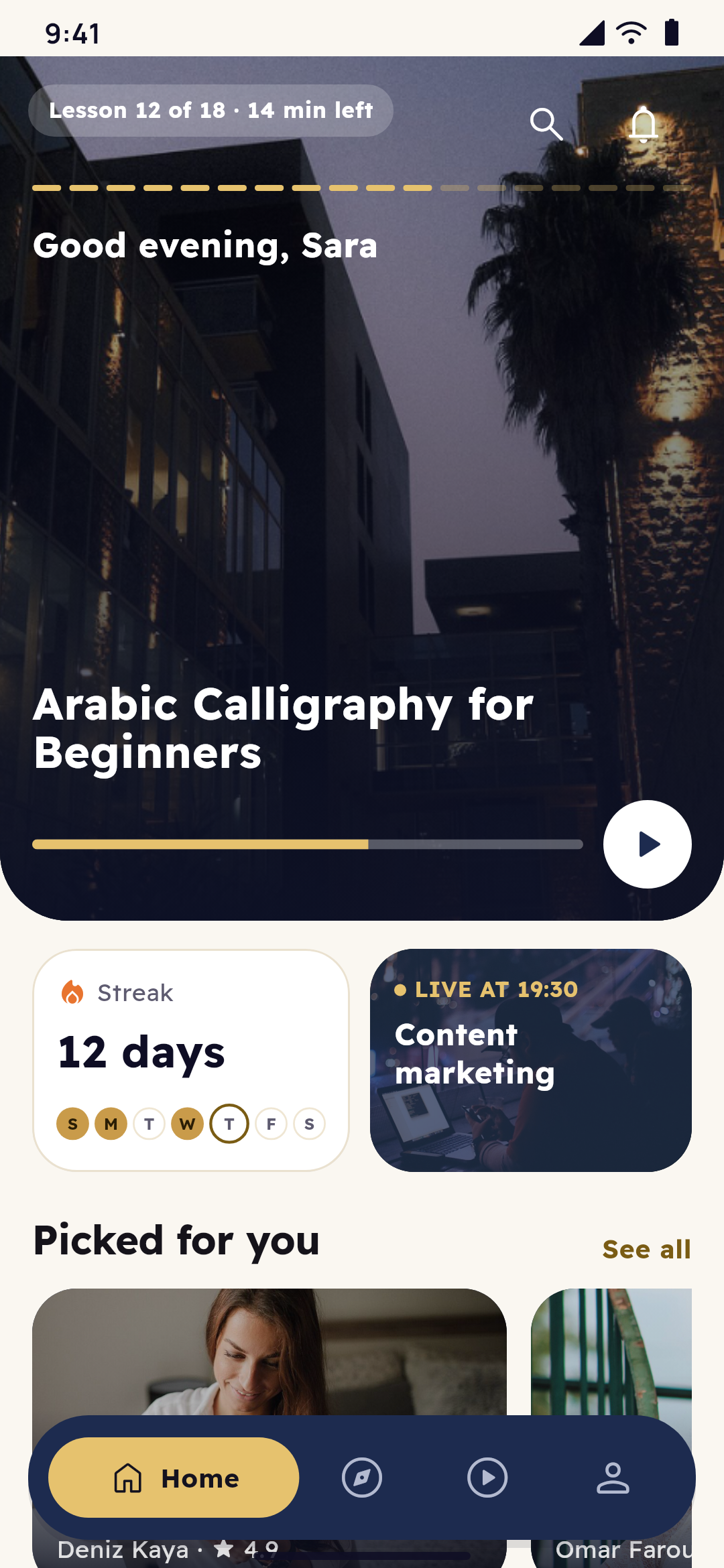
The premium academy's home: the course the student is taking full screen, their streak with this week's days, their next live class and courses picked for them
  1. 07:20A new phone

    No password to remember

    Sara's old phone gave up last week. On the new one she installs Ufuq Academy, types her number and the one-time code that comes to it, while a ring on the screen counts down the time it's good for. No password to type. Her account opens as she left it: two courses, thirty-eight hours of learning, her orders and her quiz results. Her place in every lesson was kept by the academy, not by the old phone.

    A woman with a cup of coffee, looking at her phone
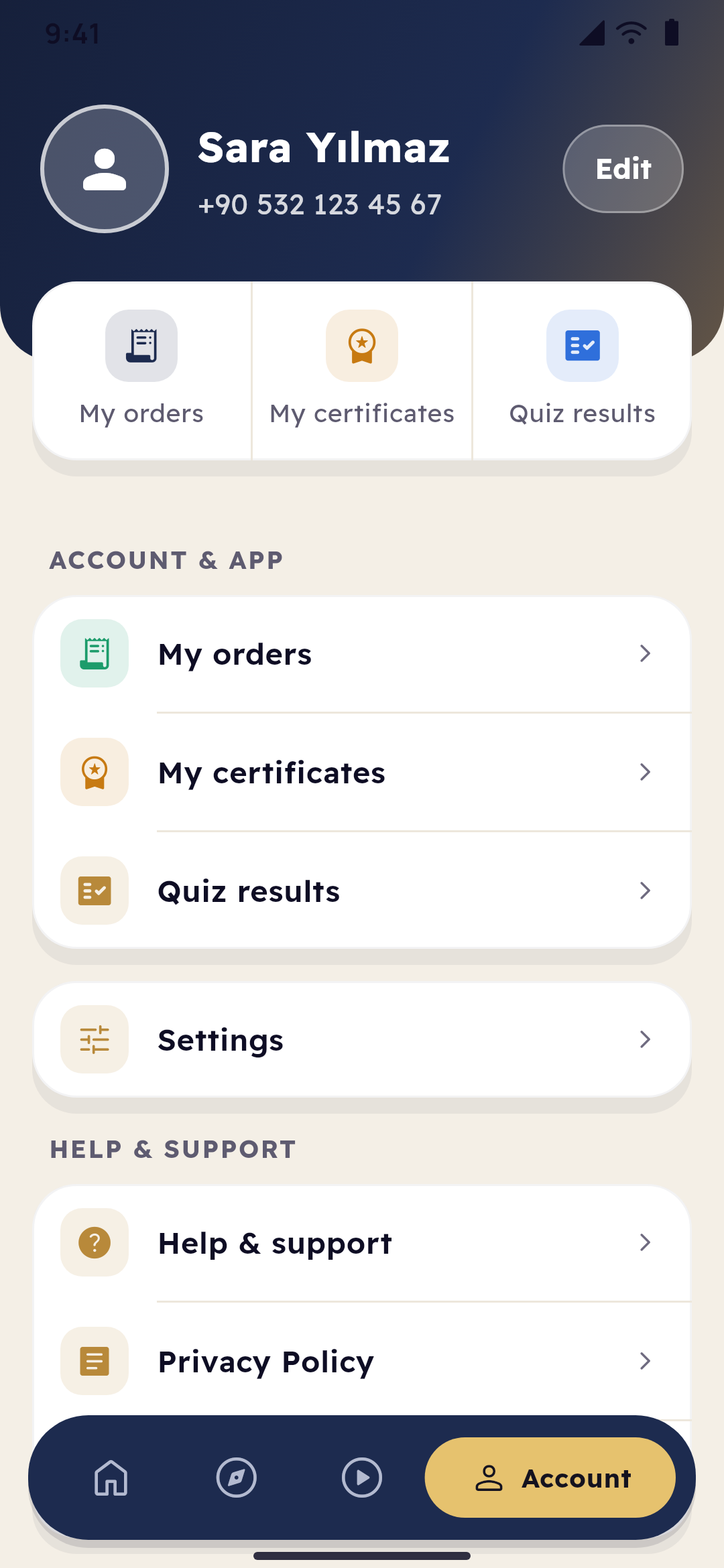
    The account: the student's courses, certificates and hours of learning, and the night switch in gold
  2. 07:35Breakfast

    Good morning, Sara

    Wednesday, 11 November, and her name at the top. Below it, the course she's taking: Arabic Calligraphy for Beginners with Leila Haddad, lesson 12 of 18, Alif and Ba in Naskh, 14 minutes left, 61% done, and a button to go on. Beside her learning streak of twelve days is tonight's live class, Content marketing, at 19:30. Further down, courses picked for her.

    A young woman at her desk with a laptop, a book and her breakfast
    The premium academy's home: the course the student is taking full screen, their streak with this week's days, their next live class and courses picked for them
  3. 08:10On the way

    A quarter more than last week

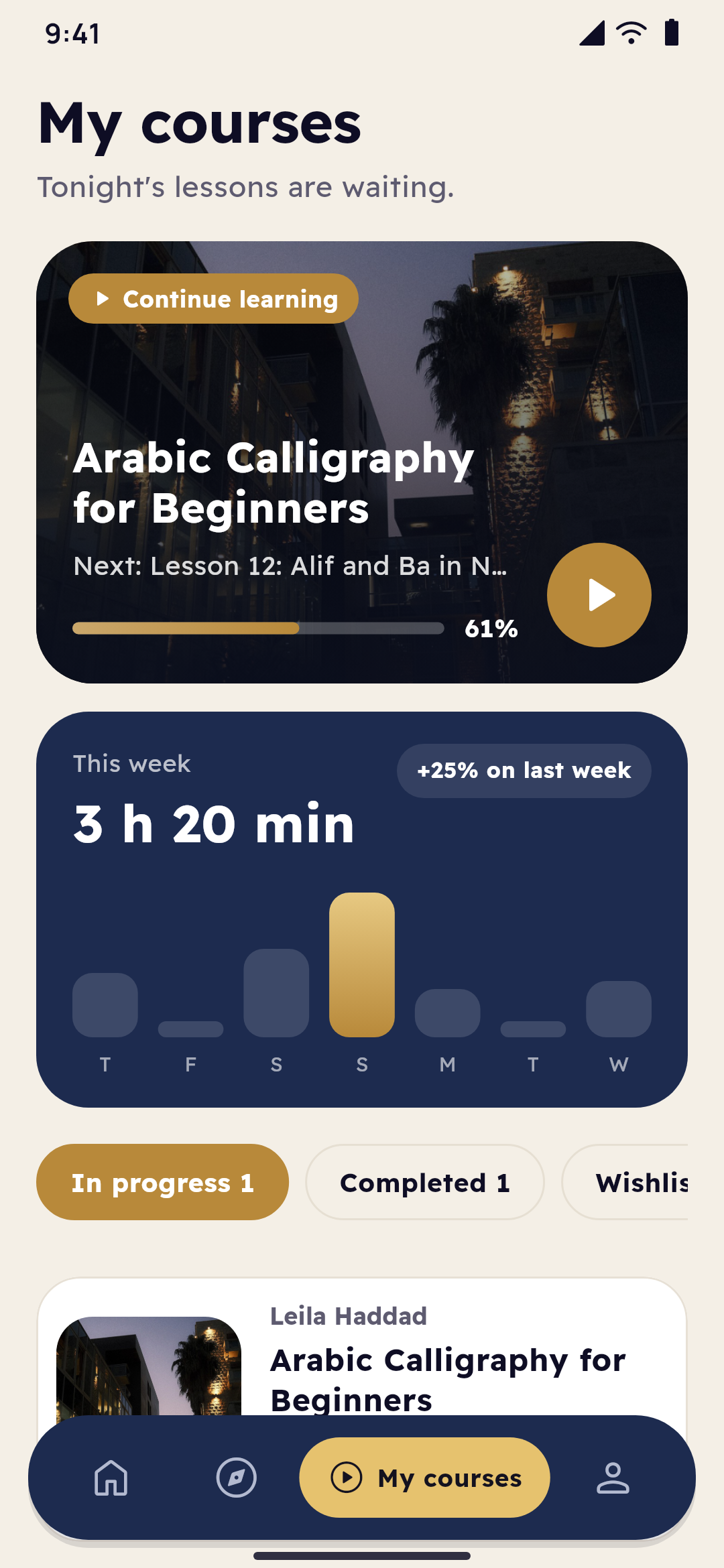
    On the tram she looks at her week: 3 h 20 min so far, 25% more than last week, a bar for each day, counted from the time she really spent in lessons. One course in progress, one completed, and the calligraphy in a ring at 61%, eleven lessons of eighteen behind her.

    My courses: this week's learning by day, the courses with a ring for how far the student is, and their certificates
  4. 12:30Lunch break

    Something new to learn

    In Explore she searches and taps a subject: Design, Business, Languages, Photography. The chips narrow it down: all, free, top rated, newest. Each course is a row with its badge, rating, lessons, teacher and price. UX Design Fundamentals by Deniz Kaya is New and rated 4.9; Excel for Small Business Owners is a Bestseller, and free.

    Explore: the search with its filters, the subjects as icons, and the courses with their badges, rating and price
  5. 12:36The course's page

    Before she decides

    A tall cover with the subject, Design, a Certified certificate tag, 4.9 from 418 reviews, 32 lessons and 10 h 10 min. Deniz Kaya on a card of their own. The curriculum, About the course and the reviews are chips; she opens the units and reads the reviews. At the foot: ₺1,450, and Join now in gold.

    A course's page: its subject and certificate on a tall cover, its teacher, the curriculum as chips and Join now in gold
  6. 12:44The cart

    Two courses, one checkout

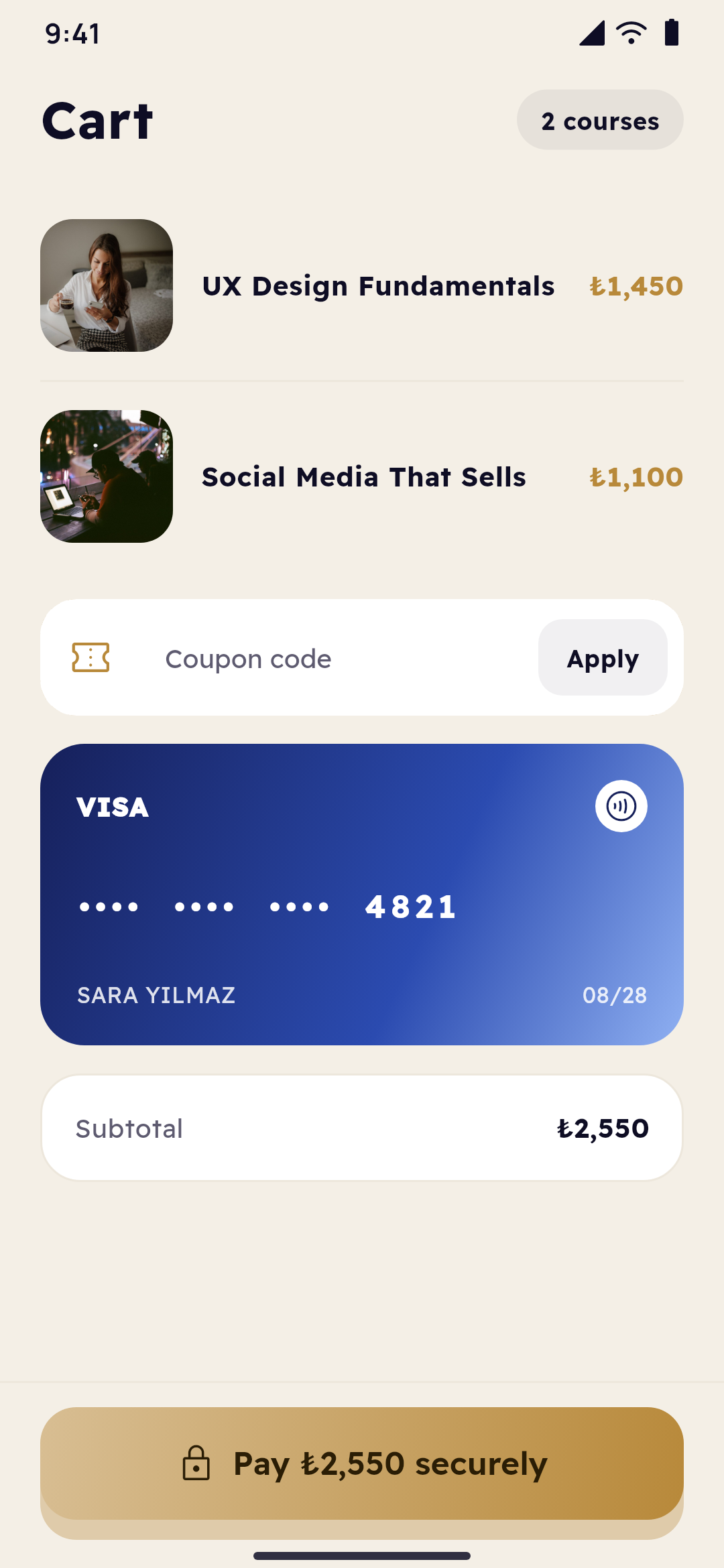
    She adds Social Media That Sells beside it: ₺2,550 for both, a field for the academy's coupon, and the card she saved, shown only by its brand, its last four digits and its expiry. Pay ₺2,550 securely, in gold. Paying by card in the app is for Android, when the academy turns it on; on iPhone, courses are bought through Apple's in-app purchase or not at all. The cart, the coupon and the saved card come with academies on WordPress with Tutor LMS selling through WooCommerce: the site's payment gateway keeps the card, and its number never reaches the app or Yallapp. The demo runs on Yallapp, so there Join now opens a demo payment page that takes no card.

    The cart: the courses, the academy's coupon, the card the student saved before and the total
  7. 19:15The live class

    Fifteen minutes early

    The reminder came in the hour before. At a quarter past seven, fifteen minutes before it starts, the Join button opens Content marketing in the meeting app the academy uses. Had she missed it, the recording would have been in the app once the class was over.

    Someone at a laptop late in the evening, by a window over the city
    The premium academy's home: the course the student is taking full screen, their streak with this week's days, their next live class and courses picked for them
  8. 21:50Night

    Layout principles

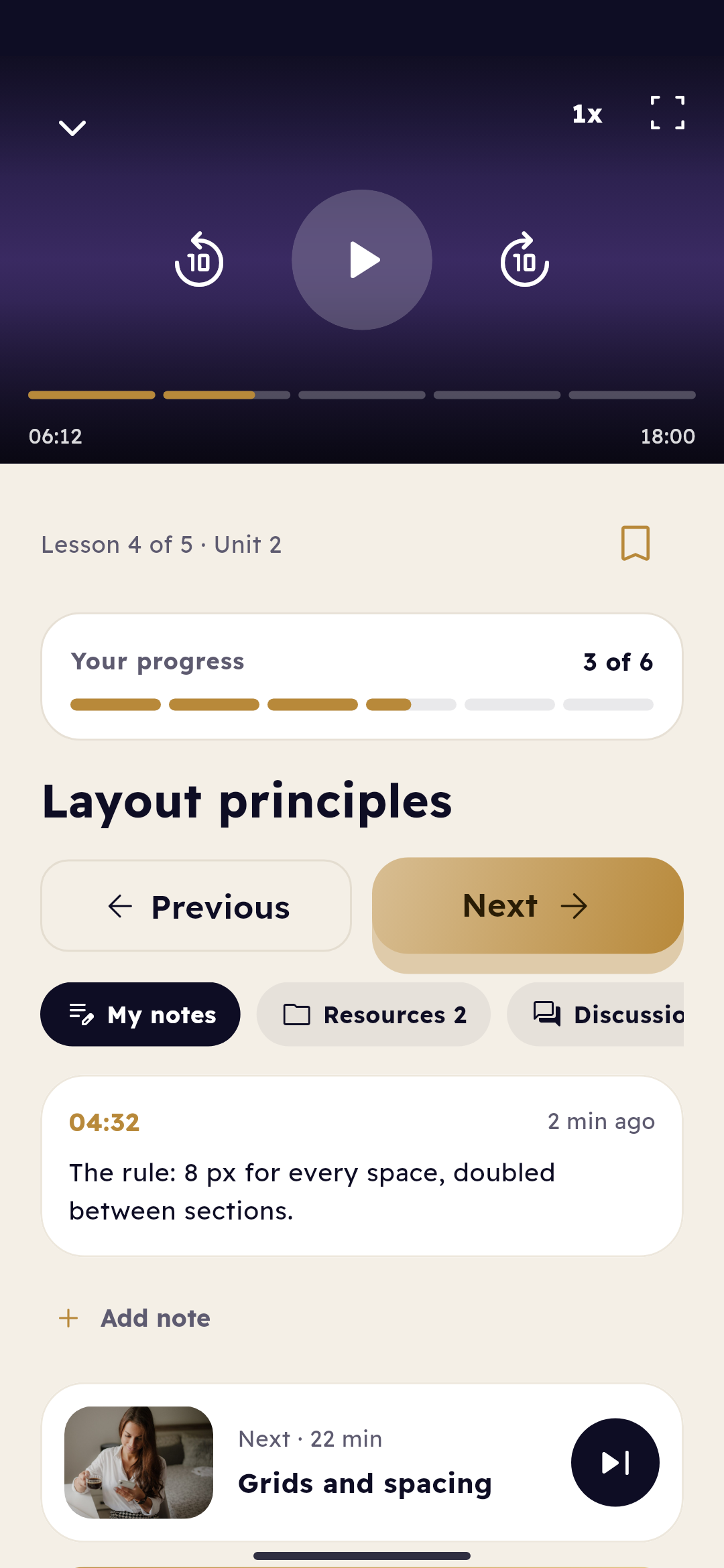
    By night she's three lessons into her new course: lesson 4 of 5, Unit 2, Layout principles. At 04:32 she wrote a note, and it keeps its moment in the video: "The rule: 8 px for every space, doubled between sections." Two files wait beside her notes, the spacing guide among them, and 24 messages in the discussion. Next comes Grids and spacing, 22 minutes; the Unit 2 quiz, ten questions, opens after this lesson.

    A lesson: the player in gold, the student's notes at their moment of the video, the files, the next lesson and the unit's quiz
Buildings lit up in the evening
Twelve days in a row, a few minutes at a time.
Every card on Sara's home screen comes from what she really did: the lessons she finished, the minutes she spent, the class she joined.

Small facts behind a student's day

  • 15 minbefore a live class, its Join button opens
  • 10 sback or forward in a lesson's video, with one tap
  • 3languages the template comes in: English, Arabic right to left, and Turkish
  • 0card numbers that reach the app or Yallapp: a saved card stays with the site's payment gateway
Everything it does

Every part, explained

The student's app, buying courses, the academy's dashboard, the design in Studio and what a WordPress site adds, as they are today.

Student app

A home that knows where she stopped

Home, Explore, My courses and Account, under a frosted bar in the academy's colours, in light and dark.

  • Greeting and her own cardsToday's date and the student's name; the course she's taking with the lesson she's on, the minutes left and a button to go on.
  • Learning streakThe days in a row she learned, over this week's days.
  • This week's learningBars by day and the change from last week, from the time really spent in lessons while the app is open.
  • ExploreA large title, search with filters, subjects as icons, and chips for all, free, top rated and newest.
  • The video playerSpeed, full screen, and ten seconds back or forward, for academies with video lessons.
  • Notes, files and discussionHer own notes at their moment of the video, the lesson's files and its discussion.
  • Quizzes and certificatesThe unit's quiz after its lessons, the score at once, and a certificate when the course is done.
  • Live classesWhen the next one starts, joining from fifteen minutes before in the meeting app, and the recording afterwards.
  • My coursesLearning and completed, and saved where the site keeps a wishlist, with their counts; each course with a ring for how far she is.
  • DownloadsLessons saved on the phone for when there's no connection, kept encrypted, where the academy offers them.
  • AccountHer courses, certificates and hours of learning; orders, certificates, quiz results, dark mode, notifications, language and settings.
  • Sign in by phoneA one-time code instead of a password, with a timer ring on the code screen; or by email.
  • Protected videoUploaded videos play from links that expire, with a watermark of the student's number.
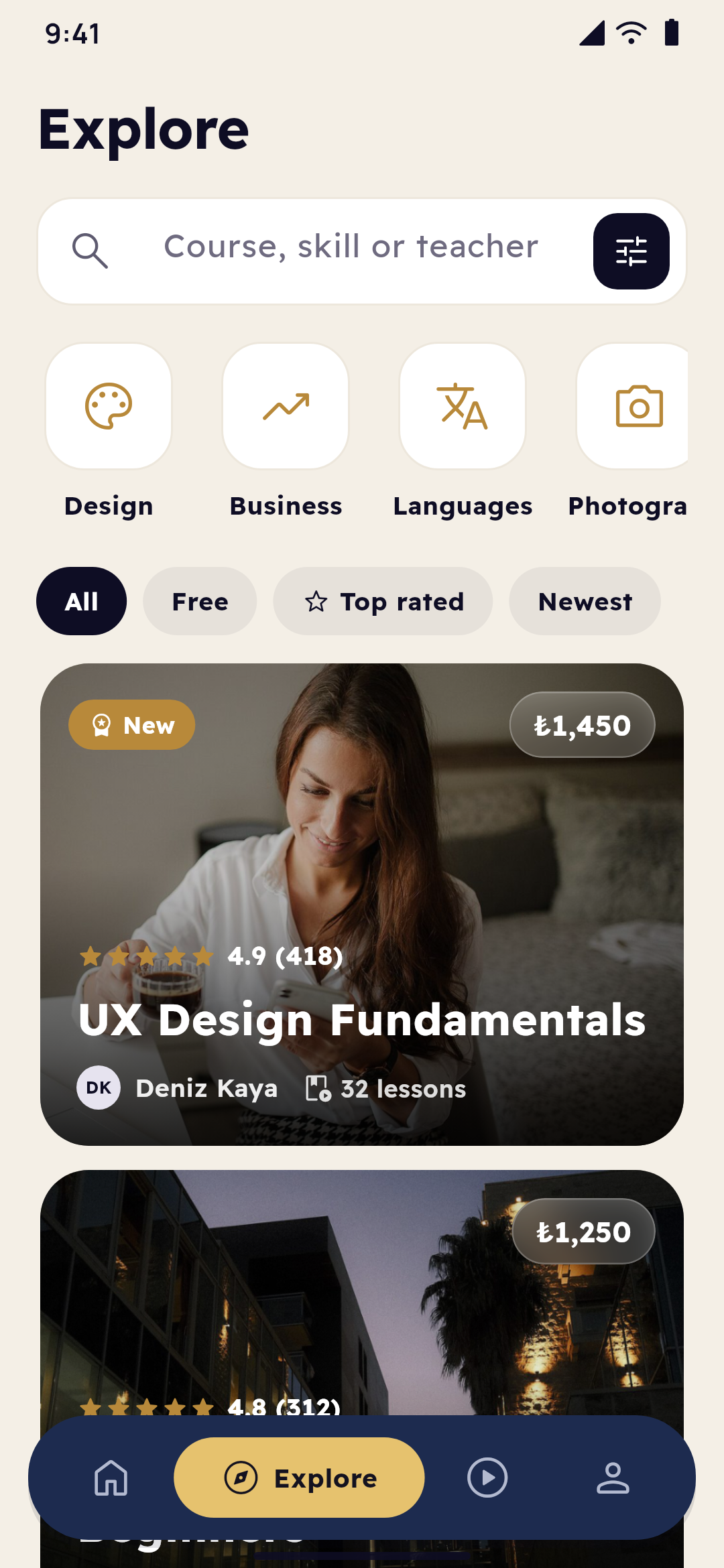
Explore: the search with its filters, the subjects as icons, and the courses with their badges, rating and price
A lesson: the player in gold, the student's notes at their moment of the video, the files, the next lesson and the unit's quiz
Buying courses

Join now, by the stores' rules

Free courses are one tap away on Android and iPhone. Paid ones are bought only where the stores' rules allow it.

  • Free coursesJoined with one tap, on Android and iPhone.
  • Join now, in goldOn the course's page, with its price, and the old price and the saving when it's on sale.
  • Card on AndroidPaid by card in the app on Android, when the academy turns it on.
  • On iPhoneCourses bought through Apple's in-app purchase, or not sold in the app at all.
  • The cartWith WordPress and WooCommerce, several courses in one checkout, each with its picture and its price.
  • The site's couponWith WordPress and WooCommerce, a coupon of the site's and what it takes off.
  • The saved cardWith WordPress and WooCommerce, the card saved with the site's payment gateway: its brand, last four digits and expiry. Card numbers never reach the app or Yallapp.
  • OrdersEvery order, in the student's account.
A course's page: its subject and certificate on a tall cover, its teacher, the curriculum as chips and Join now in gold
The cart: the courses, the academy's coupon, the card the student saved before and the total
The academy's dashboard

Courses, classes and students, on the web

An academy without a website runs its courses from the dashboard's Courses page, and changes show in the app at once.

  • CoursesA title, a cover, a price or free, a teacher, a level and categories; hidden while it's being made.
  • Sections and lessonsWritten lessons, or video from the media library, YouTube, Vimeo or a file's address; files and free previews.
  • QuizzesA pass mark, attempts and a time limit; the right answers never reach the app.
  • Assignments and live classesIn the course's sections, in the academy's own order.
  • CertificatesFor students who finish every lesson and pass every quiz, with the academy's logo and colour, and a code that proves them.
  • Lessons that open laterSome days after enrolling or on a date; and access that ends after the days you choose.
  • Learning pathsCourses one after another, and courses to finish before another.
  • Students' progressEach student's lessons, best scores and last time learned, and all of it as a CSV file.
  • Add a student by phoneFor a course sold another way, by the number they sign in with.
  • DevicesHow many devices each student may use.
  • NotificationsA new lesson, a live class in the hour before, a graded assignment and the study reminder go by themselves; and your own messages.
  • Questions and reviewsAnswer students' questions; reply to reviews or hide them.
  • Points and badgesWhen you turn them on: points for lessons, quizzes and streak days, badges, and leaderboards with first names only.
Designed in Yallapp Studio

Every colour is the academy's

The premium academy is a Studio template: navy and gold to begin with, and every part of it the owner's to change.

  • ColoursThe main colour is the brand's, gold the second; every colour can be changed.
  • The barA frosted floating bar that names every tab, the open one in the academy's colour.
  • Every screen's lookHome, Explore, the course's page, the lesson, My courses, the account and the cart, each designed in Studio.
  • Light and darkEvery screen in both, and the student chooses.
  • Sign-inThe welcome over a photo or the app's colours, and the form on a card.
  • Course cardsRows with their badge, rating, lessons, teacher and price, or covers with a gold badge.
  • Three languagesEnglish, Arabic right to left, and Turkish.
  • A web page as a tabOn WordPress, the site's blog in the app, with its header and footer hidden.
The account: the student's courses, certificates and hours of learning, and the night switch in gold
My courses: this week's learning by day, the courses with a ring for how far the student is, and their certificates
With a WordPress site

Tutor LMS and WooCommerce, in step with the app

An academy that already sells on WordPress with Tutor LMS keeps its site: the app takes its courses, students and orders from it.

  • Courses from the siteIts courses, lessons and quizzes, graded by the LMS.
  • Progress in stepA lesson completed in the app is completed on the site.
  • Reviews, questions, wishlistWhen the LMS has them.
  • Following teachersOn WordPress, and in an academy with many teachers: follow a teacher, and their new course reaches the inbox and the phone.
  • One checkoutEvery course in the cart goes to the site's WooCommerce checkout, with the coupon and the saved card chosen.
  • Saved cardsKept by the site's payment gateway; the app shows only the brand, the last four digits and the expiry.

One app, one dashboard, and your website if you have one

The students' app is built and published under the academy's name from one Studio project. Its courses come from Yallapp, or from the academy's WordPress site.

  1. Ufuq AcademyStudents, on Android and iPhone
  2. Yallapp StudioThe academy: its design, courses and students
  3. The academy's websiteWordPress with Tutor LMS, if it has one
  • A lesson completed keeps her place on every device
  • Minutes in a lesson add up in this week's learning
  • A new lesson reaches the course's students
  • The last quiz passed brings the certificate
  • A design published in Studio shows in the app
  • On WordPress, progress and orders stay in step with the site

How it compares

Companies that sell course platforms with apps, as their own sites describe them, next to Yallapp and to having an agency build an app for you.

  • Yallapp Studio

    What it is
    A Yallapp Studio template
    Apps included
    The academy's own app for its students, and Studio for you
    Under your own name
    Yes: your name, your icon, your store accounts
    How it's priced
    A Studio plan; no share of your course sales
    Prices published
    Yes, on this page
    Arabic stated
    Yes: Arabic, right to left, in the app and in Studio
  • Kajabi1

    What it is
    Subscription software
    Apps included
    Its website and the Kajabi app; an app under your brand as an extra
    Under your own name
    Yes, a branded app: on its top plan, an add-on on the others
    How it's priced
    Monthly or yearly plans; card processing fees apart
    Prices published
    Yes
    Arabic stated
    Not among its listed site languages
  • Thinkific2

    What it is
    Subscription software
    Apps included
    Its website and the Thinkific app; a branded app as an add-on
    Under your own name
    Yes, as a paid add-on, in your own store accounts
    How it's priced
    Monthly or yearly plans; a gateway fee on lower plans with your own Stripe or PayPal
    Prices published
    Yes
    Arabic stated
    Courses may be written in Arabic; its site text and right to left are not offered
  • LearnWorlds3

    What it is
    Subscription software
    Apps included
    Its online school; a mobile app as a paid add-on on higher plans
    Under your own name
    Yes, in your own developer accounts, with a one-time publishing fee
    How it's priced
    Monthly or yearly plans; a fee per sale on its first plan; the app an add-on
    Prices published
    Yes
    Arabic stated
    Right to left stated for some languages; Arabic pages through a translation integration
  • Graphy4

    What it is
    Subscription software
    Apps included
    Its website; Android and iOS apps from its middle plan
    Under your own name
    Yes, a branded app from its middle plan
    How it's priced
    Monthly plans; no transaction fee stated
    Prices published
    Yes
    Arabic stated
    Not stated
  • Custom build by an agency

    What it is
    An app built for you from scratch
    Apps included
    What you specify and pay for
    Under your own name
    Usually yes, under your accounts
    How it's priced
    Quoted after scoping; hosting, maps and upkeep usually extra; months of work
    Prices published
    Rarely
    Arabic stated
    Depends on the team

As stated on their own sites, checked in November 2026. Their offers change: read their pages for today's terms.

Where each line comes from

  1. Kajabi: kajabi.com[1][2][3][4]
  2. Thinkific: thinkific.com[1][2][3][4]
  3. LearnWorlds: learnworlds.com[1][2][3][4][5]
  4. Graphy: graphy.com[1][2]
Yallapp Studio

The Studio plans

This bundle is a Yallapp Studio project. Pick the plan that fits, and the team sets it up with you.

  • Yallapp Studio

    Studio App Starter

    $463/ year
    • 4 Studio pages per project
    • Android and iOS
    • 5 GB for videos and files
    Publish to
    5 app stores · You publish with our guides
    • The iOS app
    • We publish for youNot included in Studio App Starter
    • Delivery & couriersNot included in Studio App Starter
    • A second app for couriersNot included in Studio App Starter
    • Food deliveryNot included in Studio App Starter
    • Multi-vendor apps: restaurants, supermarkets and storesNot included in Studio App Starter
    • Ride hailing
    • Academies with many teachersNot included in Studio App Starter
    • Schools for students, parents and teachersNot included in Studio App Starter
    • Universities: registration, results and the GPANot included in Studio App Starter
    • Motion in the editor
    • Templates
    • Up to 4 pages per project
    • 5 GB of media storage
    • Up to 1,000 app users
    • 1 app language
    • Projects: rides
    • Android and iOS apps
    • Motion in the editor
    • Pages saved as your own templates
    • Email support
    Start with Studio App Starter
  • Yallapp Studio

    Studio App Pro

    $741/ year
    • 10 Studio pages per project
    • Android and iOS
    • 20 GB for videos and files
    Publish to
    5 app stores · You publish with our guides
    • The iOS app
    • We publish for youNot included in Studio App Pro
    • Delivery & couriersNot included in Studio App Pro
    • A second app for couriersNot included in Studio App Pro
    • Food deliveryNot included in Studio App Pro
    • Multi-vendor apps: restaurants, supermarkets and storesNot included in Studio App Pro
    • Ride hailing
    • Academies with many teachers
    • Schools for students, parents and teachersNot included in Studio App Pro
    • Universities: registration, results and the GPANot included in Studio App Pro
    • Motion in the editor
    • Templates
    • Up to 10 pages per project
    • 20 GB of media storage
    • Up to 10,000 app users
    • 3 app languages
    • Projects: rides and academies
    • Android and iOS apps
    • Motion in the editor
    • Pages saved as your own templates
    • WhatsApp support
    Start with Studio App Pro
  • Yallapp Studio

    Studio App Business

    $1,852/ year
    • Unlimited Studio pages
    • Android and iOS
    • 50 GB for videos and files
    Publish to
    5 app stores · We publish for you
    • The iOS app
    • We publish for you
    • Delivery & couriers
    • A second app for couriers
    • Food delivery
    • Multi-vendor apps: restaurants, supermarkets and stores
    • Ride hailing
    • Academies with many teachers
    • Schools for students, parents and teachers
    • Universities: registration, results and the GPA
    • Motion in the editor
    • Templates
    • Up to 20 pages per project
    • 50 GB of media storage
    • Unlimited app users
    • 3 app languages
    • Projects: delivery, food delivery, rides, academies and schools
    • Android and iOS apps
    • A second app for couriers
    • We publish to the stores for you
    • Motion in the editor
    • Pages saved as your own templates
    Start with Studio App Business

Every Studio plan has

  • The Studio editor and its elements
  • Push notifications
  • Card payments through your own payment account
  • Offline downloads and automatic rebuilds
  • Chat with your customers, and loyalty points
  • Courses and memberships sold through the app stores

Chosen plan by plan

  • The iOS app
  • We publish for you
  • Delivery & couriers
  • A second app for couriers
  • Food delivery
  • Multi-vendor apps: restaurants, supermarkets and stores
  • Ride hailing
  • Academies with many teachers
  • Schools for students, parents and teachers
  • Universities: registration, results and the GPA
  • Motion in the editor
  • Templates
  • How many Studio pages a project has
All plans and prices

Now try it yourself

Install the demo on your phone and sign in with the demo number. You play every part of the story, and nothing you do reaches a real person.

A graduate in her cap, laughing

Tomorrow makes thirteen

Sara will open the app with her breakfast again, on lesson 12 of the calligraphy and lesson 4 of the design course. Leila Haddad is writing next week's lesson, and when it's added, her students will hear of it. One day there will be a certificate; the mornings before it are what the app is for.

Photo credits

The photos on this page are by these photographers, under the licences named. Thank you.

  • A young woman at her desk with a laptop, a book and her breakfast · Photo by Shixart1985 · CC BY 2.0 · Source
  • A woman studying at her desk with a laptop and a notebook · Photo by Shixart1985 · CC BY 2.0 · Source
  • Buildings lit up in the evening · Photo by Shixart1985 · CC BY 2.0 · Source
  • A graduate in her cap, laughing · Photo by Juan Ramos juanmramosjr · CC0 1.0 · Source
  • Someone at a laptop late in the evening, by a window over the city · Photo by Muhammad Raufan Yusup muhraufan · CC0 1.0 · Source
  • A woman with a cup of coffee, looking at her phone · Photo by Shixart1985 · CC BY 2.0 · Source

Ready to put your business in your customers' pockets?

Tell us about your business on WhatsApp, or create your account and start the setup today.