



Two children walking to school in the morning, hand in hand
Yallapp Studio · The school bundle

A day at Nakhla School

Before the sun is up over Maadi, a mother checks her phone. By the end of the month, the office closes the salaries. In between: one school, four kinds of people, two apps and one day you can follow minute by minute.

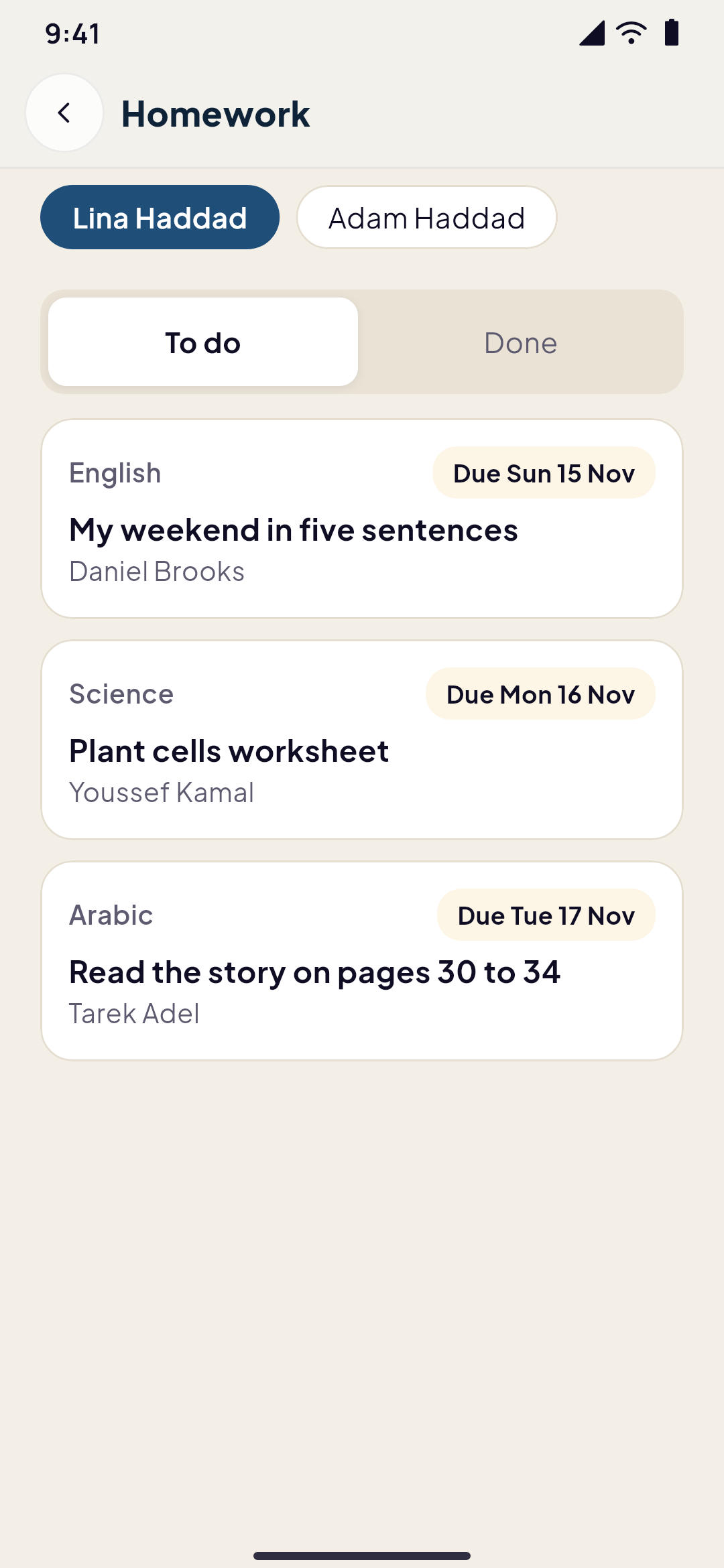
Real screen from the demoLina is in Grade 5 A. Her mother, Rania, drops nothing and forgets nothing, because the app remembers for her. Ms. Mona teaches Lina's class. Ms. Samia runs the office. Every screen below is the real app, from the Nakhla School demo you can try tonight.

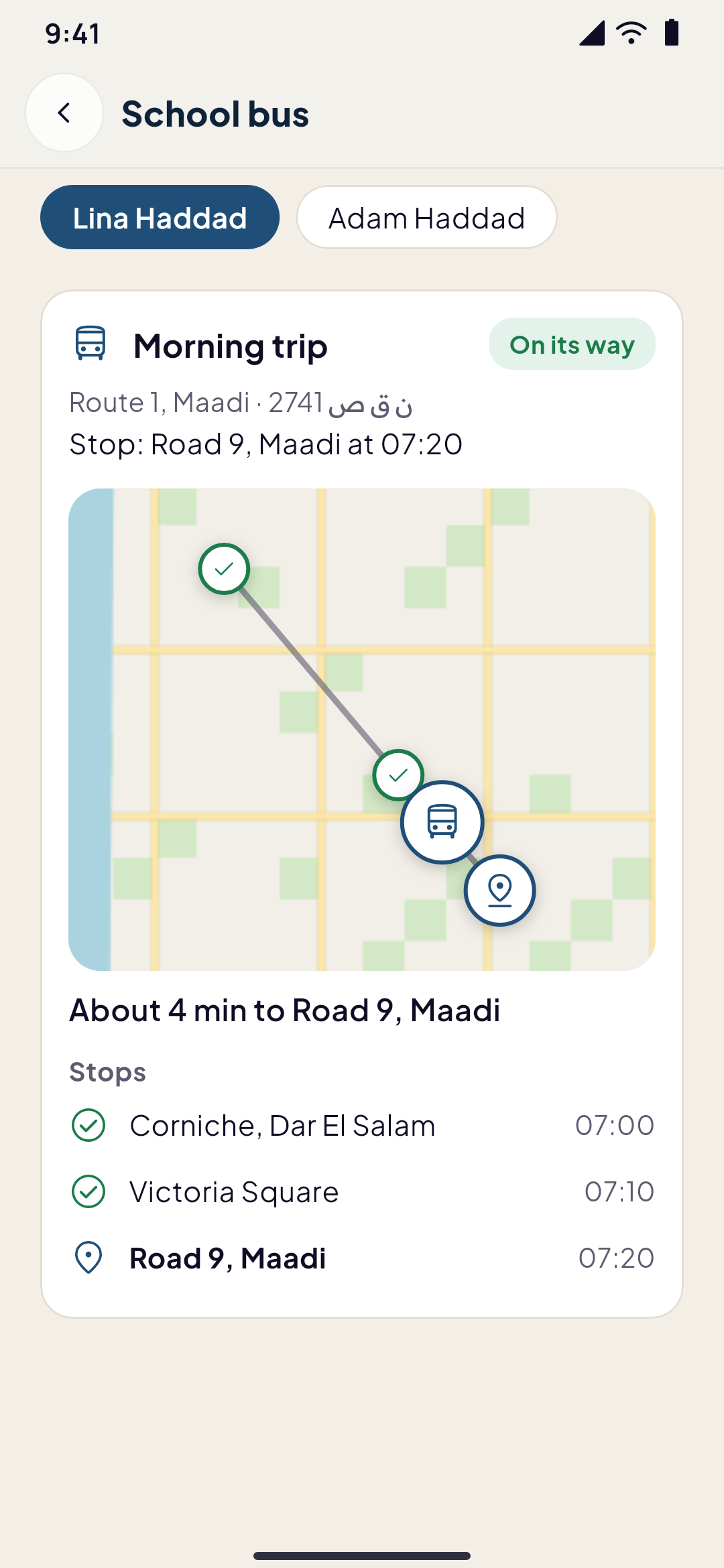
The school bus on the map, with the stops it passed and how many minutes it is from the child's stop
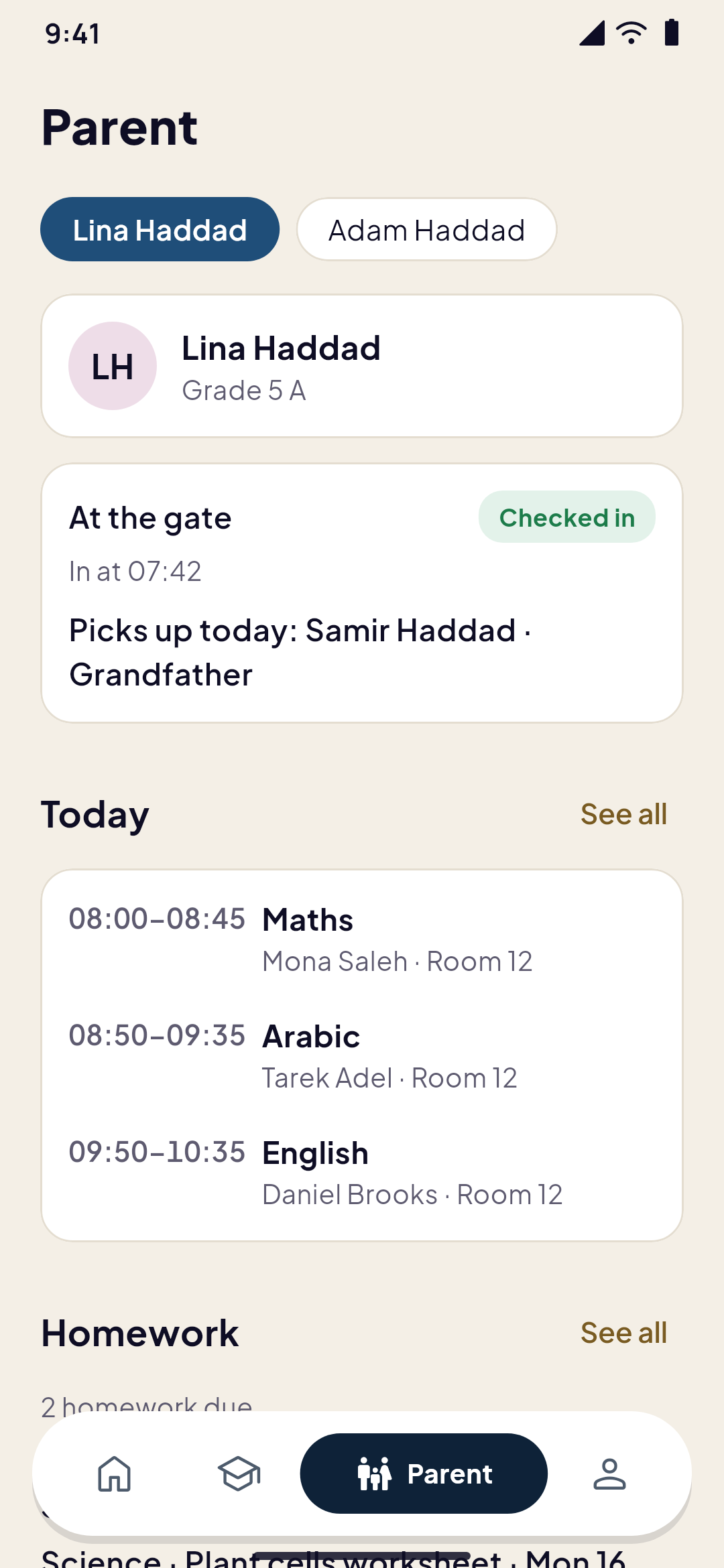
A parent's tab: a child's check-in at the gate, who picks her up today and her lessons
  1. 06:40Before dawn

    The house is still dark

    Lina's mother, Rania, makes tea and opens the Parent tab. Lina's day is already there: five lessons, two pieces of homework due, and a note Rania wrote last night so the school knows Grandpa Samir picks Lina up today. One tap and she switches to Adam's day, Lina's little brother. Same account, two children.

    A parent's tab: a child's check-in at the gate, who picks her up today and her lessons
  2. 07:16The bus

    Four minutes away

    Rania's phone buzzes while Lina ties her shoes. The bus is near. She opens the map and watches it turn off Victoria Square, a small bus moving between the stops it has passed and the one where they wait. When Lina climbs in, a second message comes: she's on.

    Nakhla SchoolnowThe bus is nearLina's bus is about 5 min from Road 9, Maadi.
    The school bus on the map, with the stops it passed and how many minutes it is from the child's stop
    Live on the map
  3. 07:46The gate

    A code that changes every thirty seconds

    At the gate a screen shows a six-digit code and its QR code, new every thirty seconds. Lina types it and she is in. A photo of the code taken a minute ago would fail, and the school can also ask for the phone to be on its grounds. At home, Rania reads one line.

    Nakhla SchoolnowLina arrived at schoolLina checked in at 07:46.
    A mother and her son on the pavement outside a school building
    The gate
    482 913A new code every 30 seconds
    A school app's home designed in Yallapp Studio: the family's greeting over the school gate with the children, the school's news and today at school
  4. 08:00First lesson

    The register, before the bell stops ringing

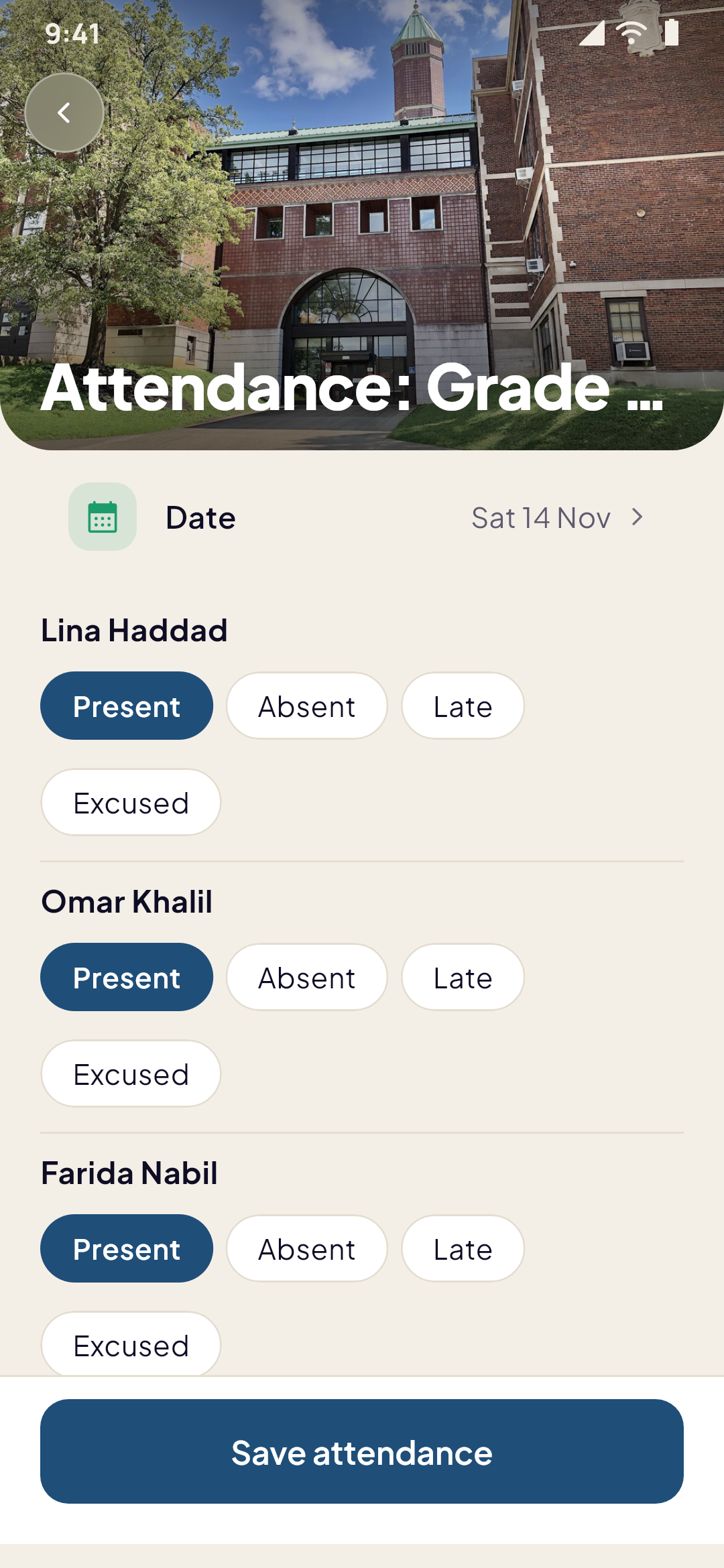
    Ms. Mona opens Grade 5 A in her staff app. Present, present, late, absent. Each name has the time it came through the gate next to it, so she isn't guessing. She saves, and the parents of the boy who isn't there know before the first sum is on the board.

    A teacher at the blackboard in front of a full classroom
    • LLina07:46Present
    • OOmar07:51Present
    • FFarida08:07Late
    • ZZiadAbsent
    • MMalak07:58Present
    A teacher taking her class's attendance in the Classroom tab
  5. 12:30Homework

    Handed in from the playground

    Lina finished the fractions last night. She writes one line, attaches nothing, and hands it in from the app. By the afternoon Ms. Mona has marked it: 9 out of 10, and a note to look at number 7 again. Rania sees the mark the moment Lina does.

    A student's homework, with what is due and the teacher's marks
  6. 13:10The library

    Waiting in turn for the atlas

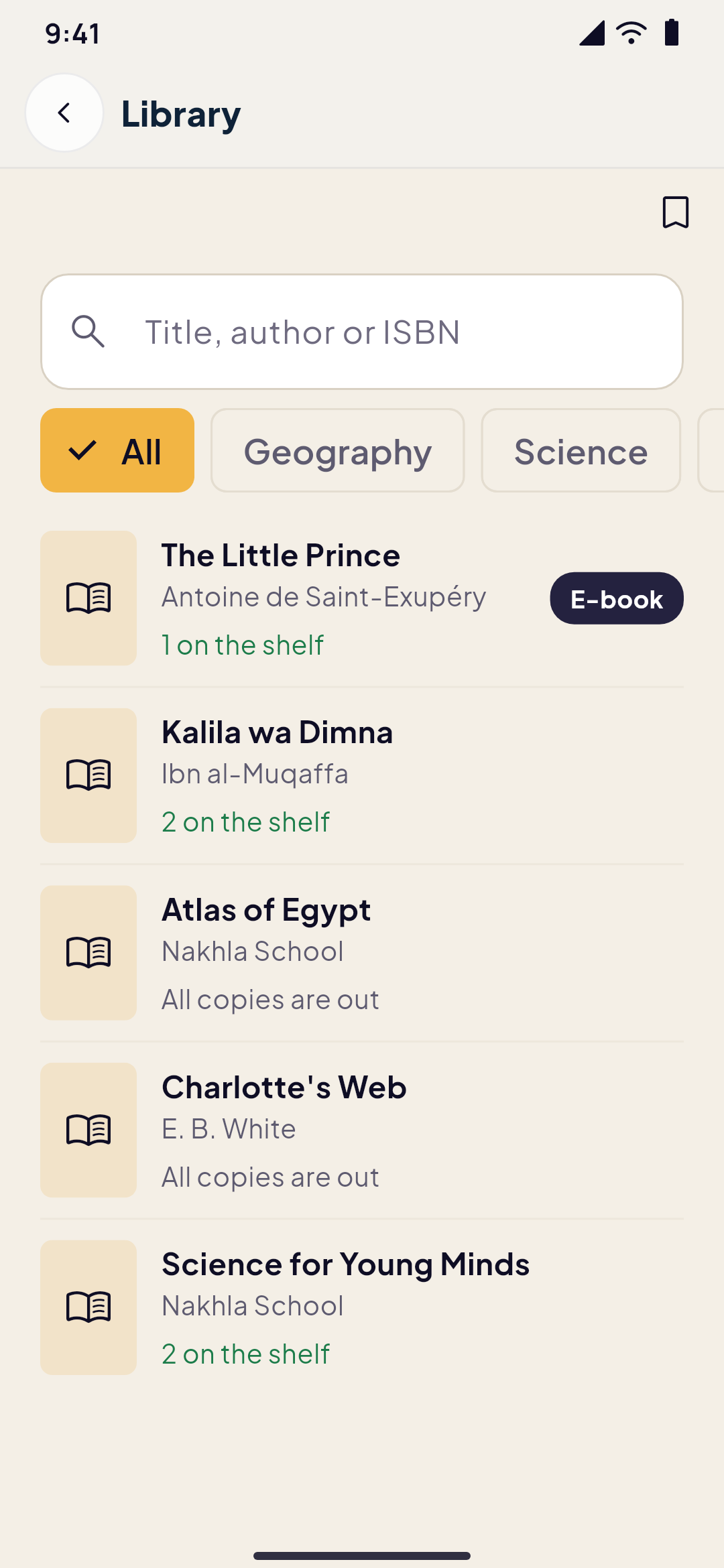
    Omar has the Atlas of Egypt, so Lina reserves it and joins the queue. When it comes back, it is held for her for a few school days, and the app reminds her before it's due back. The Little Prince she can open right now, as an e-book, in the app.

    The school library in the app: books to search, those on the shelf, those out, and an e-book
  7. 16:05After school

    The museum trip, paid before dinner

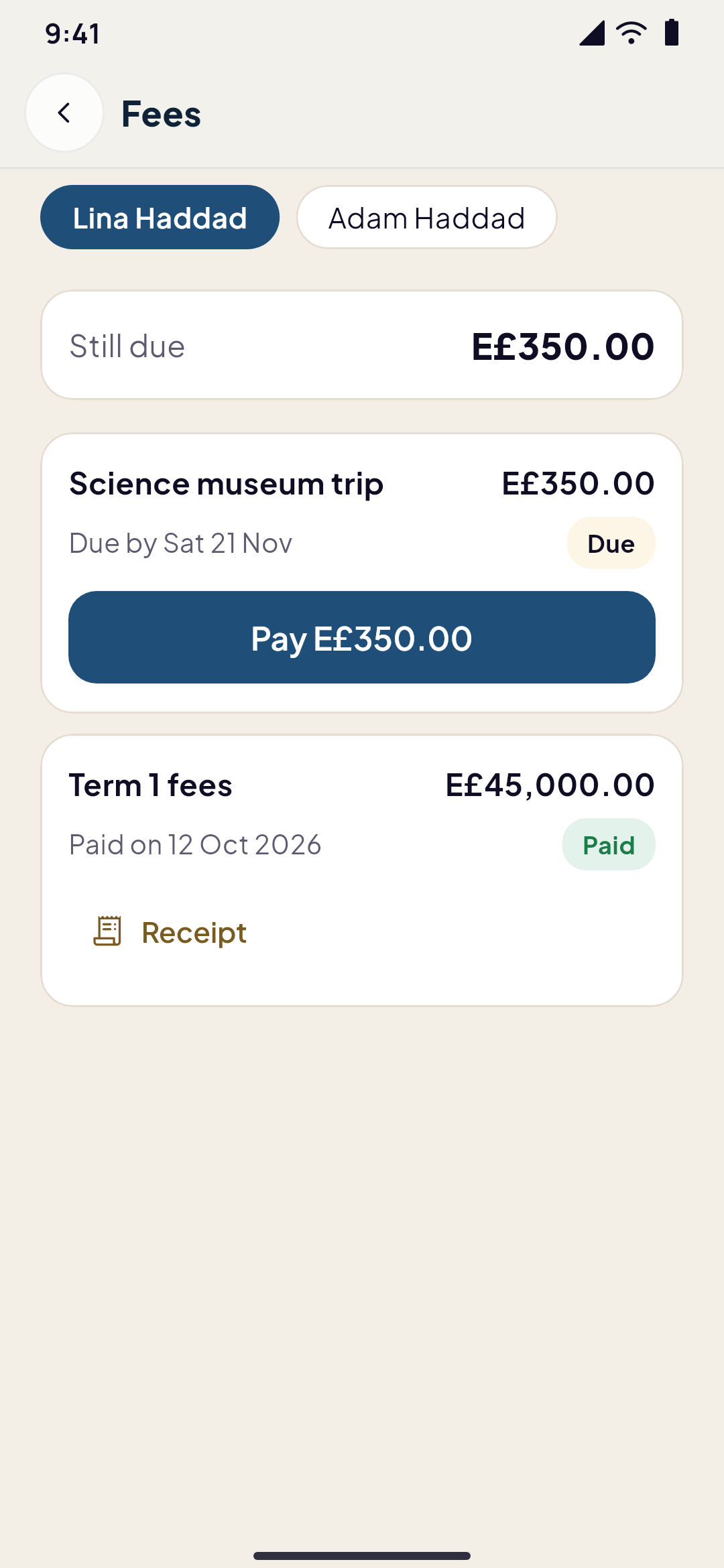
    The science museum trip costs E£350. Rania pays it by card from the Fees screen, through the school's own payment account, and the receipt lands in the app. The term's fees, paid at the office in September, are there too.

    Nakhla SchoolnowPayment receivedScience museum trip for Lina: E£350.00. The receipt is in the app.
    A child's school fees: a trip still due with a button to pay, and the term's fees paid
  8. 30thEnd of the month

    Ms. Samia closes the salaries

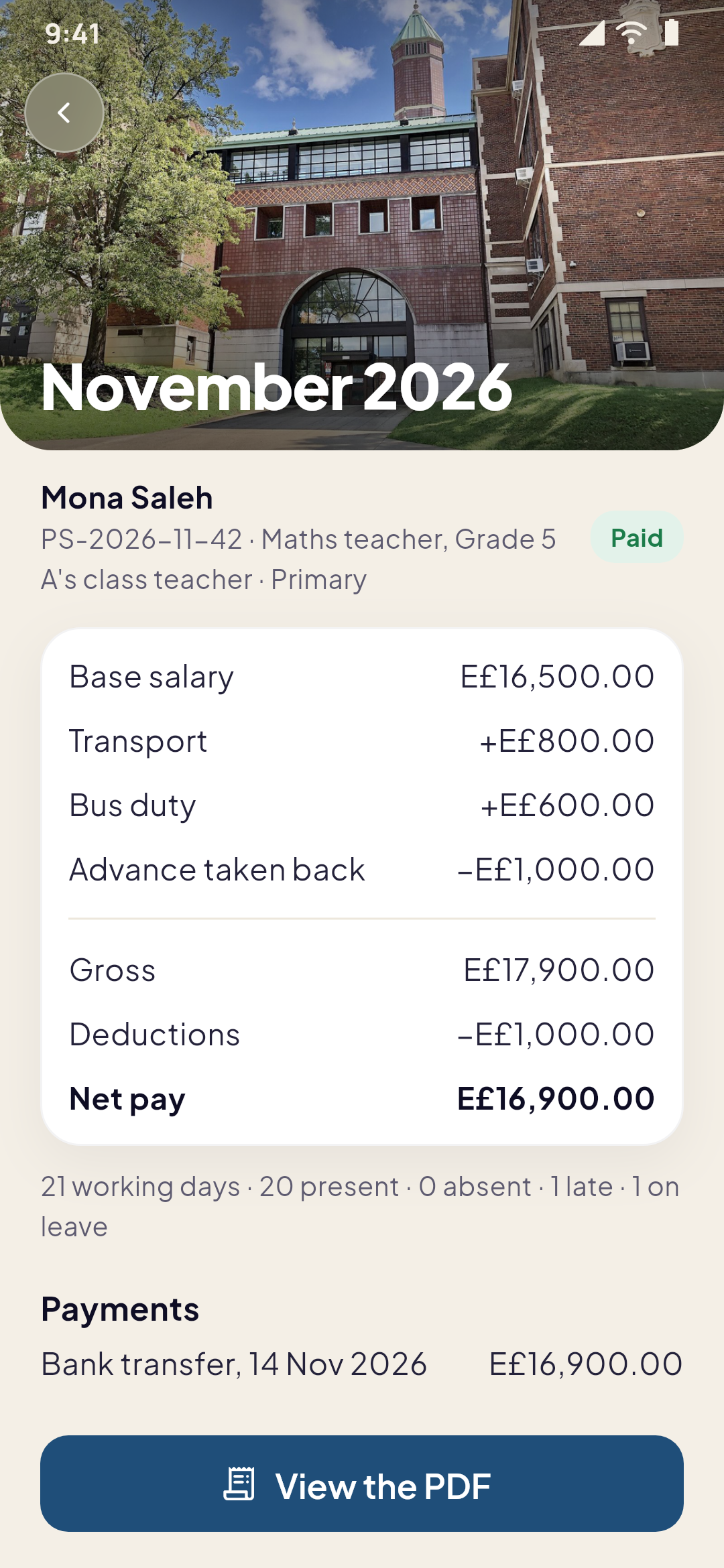
    In Studio, Ms. Samia makes the month's payslips from each person's salary and allowances. The system suggests deductions from the gate's records; she accepts one, changes another, writes a bonus for bus duty and takes back an advance's instalment. She records each payment as cash or bank transfer. No money moves through the app. Ms. Mona opens her own payslip, and its PDF, in the staff app, like every teacher.

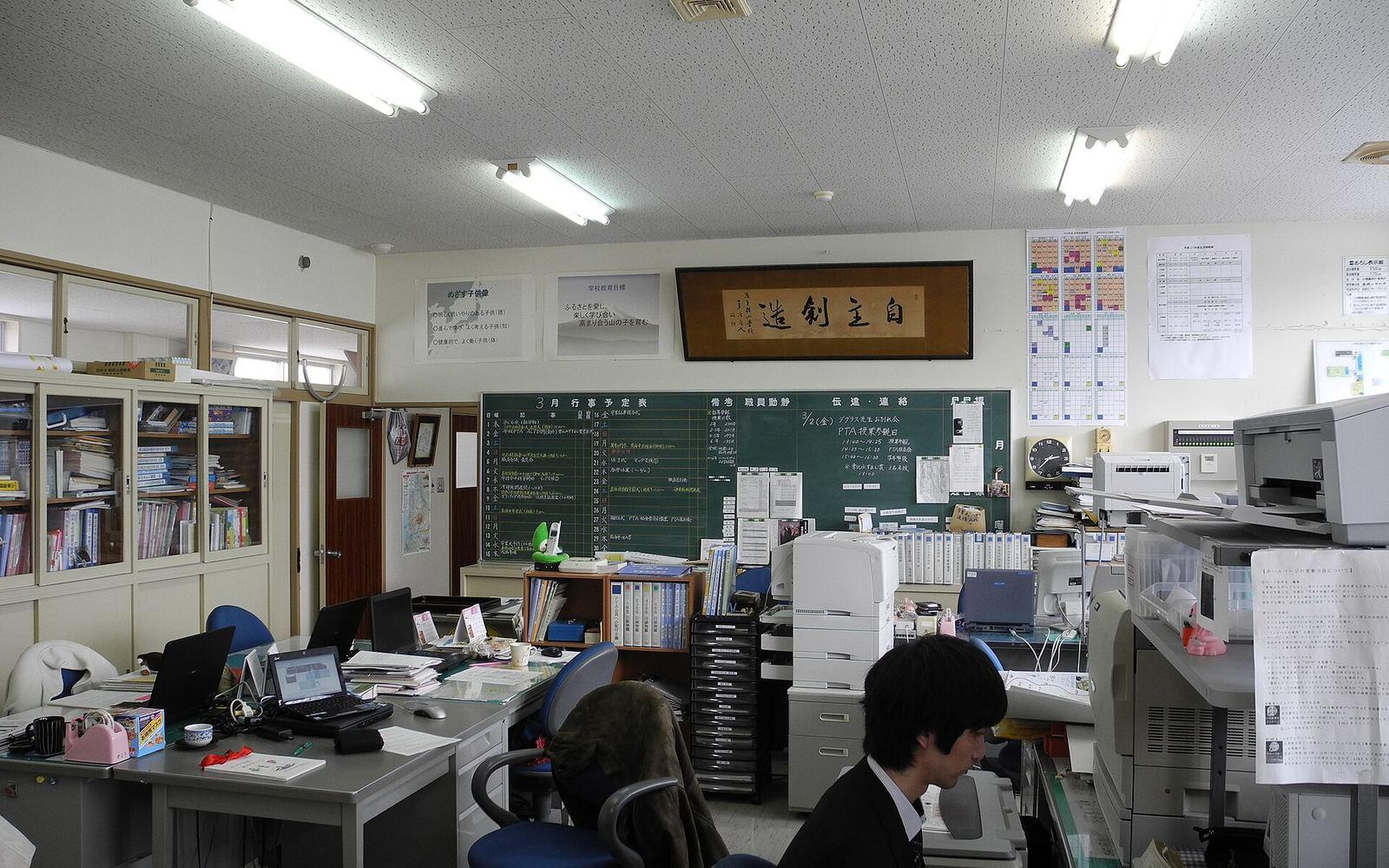
    A school's staff room with desks, files and a blackboard
    A teacher's payslip in the staff app: the salary, an allowance, a bonus, an advance taken back and the net pay
Nobody called the school today. Nobody had to.
Every message above was sent by the apps themselves, to the right person, in their own language.

Small numbers that change a school day

  • 30 sthe gate's code changes, so an old photo of it fails
  • 2apps in one bundle: the school's, and its staff's
  • 4kinds of people, each seeing only their part
  • 0payment gateways salaries go through: they're recorded by hand
Everything it does

Every part, explained

Nothing here is a mock-up. These are the screens and tools a school gets, role by role.

Student

Everything a student needs, and nothing a parent does

The School tab shows the day; the rest is one tap away. Students never see fees, permission slips or their parents' messages.

  • TimetableThe week's lessons with the teacher and the room, and today's at the top.
  • HomeworkWhat is due, handed in with a line of text or a file, marked late after the date, then the mark and the teacher's feedback.
  • Exams and scoresThe exams' timetable with the room and what it covers, and each quiz, exam and assignment's score.
  • Check in and attendanceThe gate's six-digit code typed in the app, today's times and the month's days.
  • Report cardThe term's results subject by subject, with attendance.
  • LibrarySearch by title, author or ISBN, reserve a book, wait in turn, read e-books in the app, get reminders before the due date.
  • MessagesWrite to their own teachers, when the school allows it, within the hours the school sets.
  • News and calendarThe school's and the class's news, events, holidays and exam days, added to the phone's calendar.
  • BehaviourMerits and notes from teachers, with the points they add up to.
  • The busTheir route, their stop and the bus on its way.
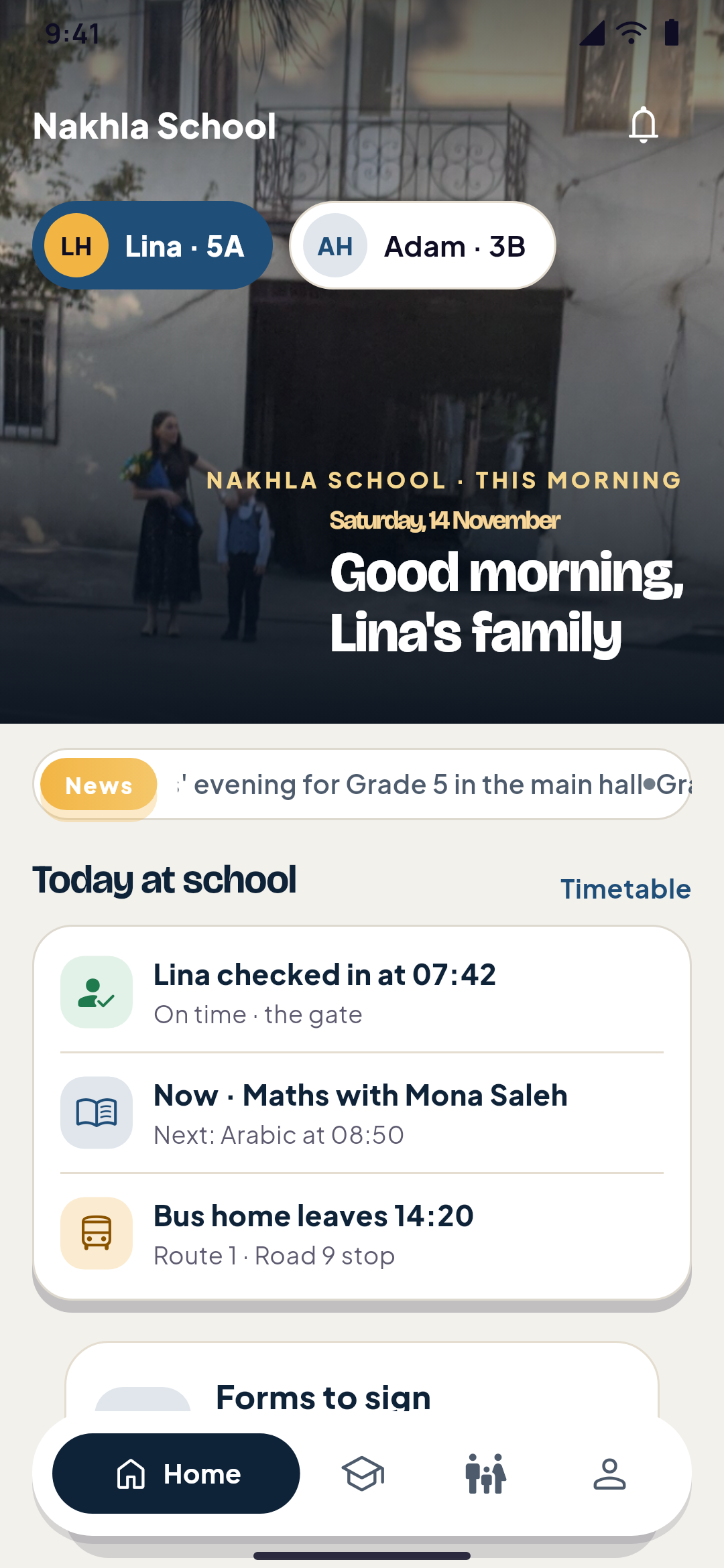
A school app's home designed in Yallapp Studio: the family's greeting over the school gate with the children, the school's news and today at school
A student's homework, with what is due and the teacher's marks
Teacher

A Classroom tab built for a teacher's real morning

Teachers work in the staff app, with the number the school added them with. Their classes, their day and their own pay, in one place.

  • Today's lessonsEach class and subject of the day, in order, with the room.
  • AttendancePresent, absent or late for each student, with the gate's time next to each name. Absent students' parents are told.
  • Homework, set and markedSet homework with files for a class; read what came in, mark it and write feedback.
  • Scores and gradebookEnter the scores of quizzes, exams and assignments; see the class's gradebook for the term.
  • BehaviourGive merits and notes from the school's categories, and take back your own on the same day.
  • SyllabusMark each topic of the plan as covered on a date, with a note.
  • ReportsWrite a report on a student or a class, keep it as a draft, send it, and answer the office's comments.
  • MessagesWrite to one family or to a whole class at once, inside the hours the school allows.
  • Bus dutyDrivers and supervisors start the trip, share the bus's position and mark who got on and off.
  • Check in and leaveCheck in at the gate, and ask for sick or annual leave with a photo or PDF of the note.
  • PayslipsEach month's payslip, what was paid and how, and its PDF.
A teacher taking her class's attendance in the Classroom tab
Parent

A Parent tab only parents ever see

One account for every child at the school. The server refuses the parent's screens to anyone else.

  • Several children, one accountSwitch between children at the top; each has their own day.
  • ArrivalsTold when a child checks in or out, and when they're late or leave early.
  • Attendance and scoresEach child's days, the latest grades and the report card.
  • FeesWhat is due and what is paid, paid by card through the school's own account, with receipts.
  • The bus on the mapThe bus live, the child's stop and how soon it gets there; told when it's near and when the child gets on and off.
  • Permission slipsSign yes or no with your name, until the due date. Reminded the evening before.
  • Absence excusesA day or several, the reason and a photo of the doctor's note; the school answers in the app.
  • Pick-upWho may pick the child up, and today's note: "Her grandfather picks her up."
  • Library booksEach child's books, and when they're due.
  • Teachers' reportsThe reports the school chose to share.
  • MessagesWrite to your children's teachers, when the school allows it.
  • Calendar, exams, behaviourEvents and exams per child, reminders the day before, and behaviour notes as the school chooses.
A parent's tab: a child's check-in at the gate, who picks her up today and her lessons
The school bus on the map, with the stops it passed and how many minutes it is from the child's stop
Administration and staff

The office, the gate, the buses and the books

The principal and the office work in Studio on the web; office staff, caretakers and bus crews also have the staff app, Nakhla School Staff, in the same bundle.

  • The staff appIts own app in the stores for teachers, office staff and bus crews, separate from the families' app.
  • The gate and the check-in boardThe gate's screen, the day's board (in, late, not in yet, left, absent, excused, on leave), the month's report as CSV, and corrections with a reason.
  • Salaries and payslipsSalaries and allowances, the month's payslips, suggested deductions to accept or change, bonuses, advances paid back in instalments, the month locked, a CSV and a PDF for each payslip.
  • LeaveRequests arrive with their papers; approve or refuse with a note, and approved days count as leave.
  • Teachers' reportsAn inbox of reports: comment, send back for changes, approve, and share with the parents.
  • Syllabus progressEvery class against its plan, the ones behind first.
  • BusesRoutes, stops on the map with their times, the students on each stop, each trip's history and a live map of the buses running now.
  • Library deskLend and return by the student's code and the copy's code, the overdue list, the books held to collect, and books imported from a CSV file.
  • NewsFor the whole school, a class, or teachers and staff only.
  • MessagesWrite to one teacher, all of them or a department; decide whether teachers and families may write to each other, when, and with files or text only.
  • Calendar and examsEvents, holidays and exam days for the school, a grade, a class or the staff; publish the exams' timetable and the families are told.
  • FeesFees per student, paid at the office or by card in the app, with receipts.
  • People from a sheetClasses, students, parents, teachers and staff imported from a spreadsheet.
A teacher's payslip in the staff app: the salary, an allowance, a bonus, an advance taken back and the net pay
The school library in the app: books to search, those on the shelf, those out, and an e-book
Universities

The same project, in university mode

A School project can run a university: faculties, programs, registration and results, with lecturers and advisors.

  • Faculties and programsDepartments and programs with their degree, credits to graduate and study plan.
  • Registration in the appSections with the seats left, lectures that don't clash, prerequisites passed and the program's credits.
  • Waiting listsA full section takes a waiting list; the first student who fits takes a freed seat.
  • AdvisorsEach registration goes to the student's advisor, who approves it or sends it back with a note.
  • LecturersTheir sections, each lecture's attendance and grades on the university's scale.
  • Results and transcriptResults by term with the term and cumulative GPA, and the transcript in the app and as a PDF.
  • Study planWhat is done, in progress and left.
  • ParentsThey see their child's results, read only.

Two apps and one dashboard, talking to each other

The families' app and the staff app are built and published under the school's name, from one Studio project. What happens in one shows up in the other at once.

  1. Nakhla SchoolStudents and parents
  2. Yallapp StudioThe principal and the office, on the web
  3. Nakhla School StaffTeachers, office staff and bus crews
  • Homework set in the Classroom reaches the student and the parent
  • A check-in at the gate tells the parent
  • The crew's phone moves the bus on the parent's map
  • A payslip made in Studio opens in the teacher's app
  • News for staff only never reaches families

How it compares

Companies that sell school apps, as their own sites describe them, next to Yallapp and to having an agency build one for you.

  • Yallapp Studio

    What it is
    A Yallapp Studio bundle
    Apps included
    The school's app for students and parents, its staff app, and Studio for the office
    Under your own name
    Yes: your name, your icon, your store accounts
    How it's priced
    A Studio plan; no fee per student
    Prices published
    Yes, on this page
    Arabic stated
    Yes: Arabic, right to left, in the apps and in Studio
  • Classera1

    What it is
    Subscription software
    Apps included
    One app with a view for each role; fees, bus and pick-up services
    Under your own name
    Not stated; its store app is listed as Classera
    How it's priced
    Demo or trial first; the fees service is a subscription
    Prices published
    No, on request
    Arabic stated
    Yes: an Arabic site and app listing
  • Fedena2

    What it is
    Subscription software
    Apps included
    Apps for parents, teachers and students, with an administrator view
    Under your own name
    Yes, stated: apps in the school's brand
    How it's priced
    Yearly subscription; cost depends on the plugins chosen
    Prices published
    Yes, for its plans; the mobile app's price not shown
    Arabic stated
    Arabic listed; right to left stated for the web product
  • MyClassboard3

    What it is
    Subscription software
    Apps included
    Teacher, parent, transport and school admin apps
    Under your own name
    The school's logo inside its apps; an own store listing not stated
    How it's priced
    Not published; apps included with the licence
    Prices published
    No, on request
    Arabic stated
    Not stated
  • WRTeam eSchool4

    What it is
    Source code to buy and run
    Apps included
    Student and parent app, teacher and staff app, web admin
    Under your own name
    You rebrand it and publish it yourself
    How it's priced
    One-time licence; hosting and publishing are yours
    Prices published
    Yes
    Arabic stated
    Not stated
  • Custom build by an agency

    What it is
    An app built for you from scratch
    Apps included
    What you specify and pay for
    Under your own name
    Usually yes, under your accounts
    How it's priced
    Quoted after scoping; hosting, maps and upkeep usually extra; months of work
    Prices published
    Rarely
    Arabic stated
    Depends on the team

As stated on their own sites, checked in November 2026. Their offers change: read their pages for today's terms.

Where each line comes from

  1. Classera: classera.com[1][2][3]
  2. Fedena: fedena.com[1][2][3]
  3. MyClassboard: myclassboard.com[1][2]
  4. WRTeam eSchool: wrteam.in[1]
Yallapp Studio

The Studio plans

This bundle is a Yallapp Studio project. Pick the plan that fits, and the team sets it up with you.

  • Yallapp Studio

    Studio App Starter

    $463/ year
    • 4 Studio pages per project
    • Android and iOS
    • 5 GB for videos and files
    Publish to
    5 app stores · You publish with our guides
    • The iOS app
    • We publish for youNot included in Studio App Starter
    • Delivery & couriersNot included in Studio App Starter
    • A second app for couriersNot included in Studio App Starter
    • Food deliveryNot included in Studio App Starter
    • Multi-vendor apps: restaurants, supermarkets and storesNot included in Studio App Starter
    • Ride hailing
    • Academies with many teachersNot included in Studio App Starter
    • Schools for students, parents and teachersNot included in Studio App Starter
    • Universities: registration, results and the GPANot included in Studio App Starter
    • Motion in the editor
    • Templates
    • Up to 4 pages per project
    • 5 GB of media storage
    • Up to 1,000 app users
    • 1 app language
    • Projects: rides
    • Android and iOS apps
    • Motion in the editor
    • Pages saved as your own templates
    • Email support
    Start with Studio App Starter
  • Yallapp Studio

    Studio App Pro

    $741/ year
    • 10 Studio pages per project
    • Android and iOS
    • 20 GB for videos and files
    Publish to
    5 app stores · You publish with our guides
    • The iOS app
    • We publish for youNot included in Studio App Pro
    • Delivery & couriersNot included in Studio App Pro
    • A second app for couriersNot included in Studio App Pro
    • Food deliveryNot included in Studio App Pro
    • Multi-vendor apps: restaurants, supermarkets and storesNot included in Studio App Pro
    • Ride hailing
    • Academies with many teachers
    • Schools for students, parents and teachersNot included in Studio App Pro
    • Universities: registration, results and the GPANot included in Studio App Pro
    • Motion in the editor
    • Templates
    • Up to 10 pages per project
    • 20 GB of media storage
    • Up to 10,000 app users
    • 3 app languages
    • Projects: rides and academies
    • Android and iOS apps
    • Motion in the editor
    • Pages saved as your own templates
    • WhatsApp support
    Start with Studio App Pro
  • Yallapp Studio

    Studio App Business

    $1,852/ year
    • Unlimited Studio pages
    • Android and iOS
    • 50 GB for videos and files
    Publish to
    5 app stores · We publish for you
    • The iOS app
    • We publish for you
    • Delivery & couriers
    • A second app for couriers
    • Food delivery
    • Multi-vendor apps: restaurants, supermarkets and stores
    • Ride hailing
    • Academies with many teachers
    • Schools for students, parents and teachers
    • Universities: registration, results and the GPA
    • Motion in the editor
    • Templates
    • Up to 20 pages per project
    • 50 GB of media storage
    • Unlimited app users
    • 3 app languages
    • Projects: delivery, food delivery, rides, academies and schools
    • Android and iOS apps
    • A second app for couriers
    • We publish to the stores for you
    • Motion in the editor
    • Pages saved as your own templates
    Start with Studio App Business

Every Studio plan has

  • The Studio editor and its elements
  • Push notifications
  • Card payments through your own payment account
  • Offline downloads and automatic rebuilds
  • Chat with your customers, and loyalty points
  • Courses and memberships sold through the app stores

Chosen plan by plan

  • The iOS app
  • We publish for you
  • Delivery & couriers
  • A second app for couriers
  • Food delivery
  • Multi-vendor apps: restaurants, supermarkets and stores
  • Ride hailing
  • Academies with many teachers
  • Schools for students, parents and teachers
  • Universities: registration, results and the GPA
  • Motion in the editor
  • Templates
  • How many Studio pages a project has
All plans and prices

Now try it yourself

Install the demo on your phone and sign in with the demo number. You play every part of the story, and nothing you do reaches a real person.

Graduates throwing their caps into the sky at sunset

In June, the hall is full

A year of mornings like this one ends in a hall full of families. The marks, the days, the books and the trips are all in the app, and the school starts September with nothing to rebuild.

Photo credits

The photos on this page are by these photographers, under the licences named. Thank you.

  • Two children walking to school in the morning, hand in hand · Photo by Julia Maudlin from Lake Oswego, Oregon, USA · CC BY 2.0 · Source
  • A mother and her son on the pavement outside a school building · Photo by OpusDEI · CC BY 4.0 · Source
  • Graduates throwing their caps into the sky at sunset · Photo by Baim Hanif baim · CC0 1.0 · Source
  • A school's staff room with desks, files and a blackboard · Photo by Douglas P. Perkins · CC BY-SA 3.0 · Source
  • A teacher at the blackboard in front of a full classroom · Photo by David Stroble · Public Domain · Source

Ready to put your business in your customers' pockets?

Tell us about your business on WhatsApp, or create your account and start the setup today.