A bouquet of pink roses and lisianthus on a deep pink background
Yallapp Studio · The flower shop

Tomorrow, between one and four

Omar works in Alexandria. His mother lives in Cairo, and tomorrow is her birthday. He remembers at 20:40, with his dinner on the stove. This is how that evening becomes flowers at her door the next afternoon, one step at a time.

Real screen from the demoOmar Hassan sends flowers to his mother, Salma Adel, in Zamalek. Leqaa is the flower shop template's demo: a shop in Cairo whose bouquets and prices are made up, and every screen below is the real app. The delivery days, card messages, flash sales and codes in the story come with every store app; in the demo, the payment page takes no card.

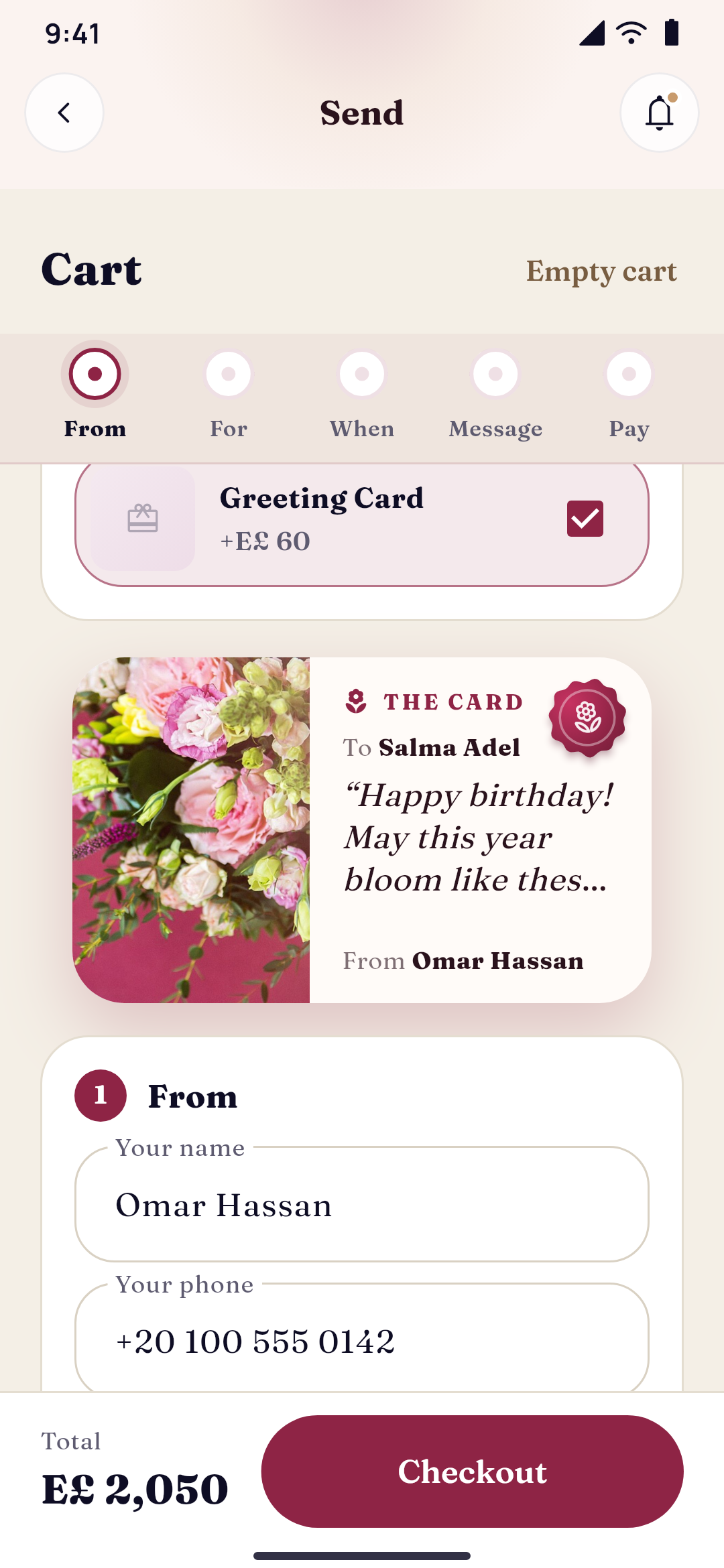
Leqaa's gift checkout: who it's from, who it's for, the delivery day and time, the card's message and the order
Leqaa, a flower shop, in its first look, Rose hour: the occasions as full-screen stories, Send today, the flash sale and the collections
  1. 20:40Alexandria, after work

    Tomorrow is the fifteenth

    Omar is warming up his dinner when he sees the date on his phone. Tomorrow is the fifteenth: his mother's birthday. He is three hours away, with a meeting at ten. He has had Leqaa on his phone since Mother's Day in March. He opens it, and the shop's occasions fill the screen one after another, in its night colours. Send today says that orders for today closed at 16:00. Tomorrow is open.

    Leqaa in its first look, Rose hour, by night: the occasions as full-screen stories, Send today, the flash sale and the collections
  2. 20:44Blush hour

    Two hours left

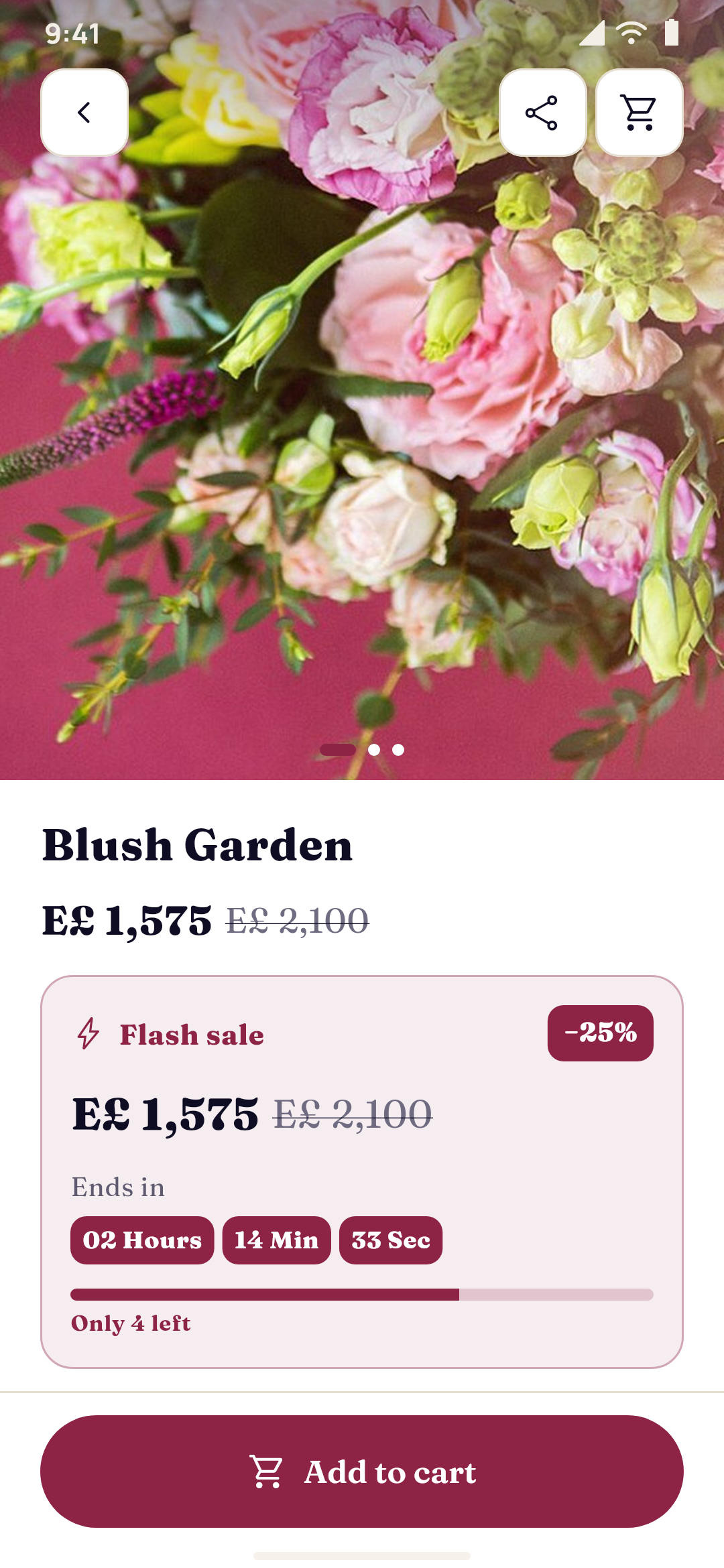
    Further down, a garnet band says Flash sale, with a timer counting down from 1:59. It's the shop's Blush hour: Blush Garden at a quarter off, the old price struck through, and a bar that shows only four of twelve are left. When the timer reaches zero, the price goes back up. He doesn't think for long. Blush is the colour of her curtains.

    Leqaa, a flower shop, in its first look, Rose hour: the occasions as full-screen stories, Send today, the flash sale and the collections
    Flash sale01:59:12Blush Garden · Deluxe−25%E£1,575E£2,100Only 4 left
  3. 20:47The bouquet's page

    Add a little more

    On Blush Garden's page the same timer keeps counting, beside the sale price and the price before it. Blush roses, lisianthus and eucalyptus, made on the day it is delivered, in three sizes by the stems: Classic with 12, Deluxe with 24, Grand with 36. He takes Deluxe. Under Add a little more are the shop's extras: a ceramic vase, a box of chocolates and a card. He adds the chocolates and the card. She always says she doesn't want chocolates, and she always finishes them.

    Pink and white ranunculus on a wooden barrel
    A bouquet in Leqaa: its photos, its three sizes, what goes with it, when it arrives and the card
  4. 20:52From, for, when

    Tomorrow, after lunch

    The checkout is five steps on one screen: from, for, when, the message, pay. From: his name, phone and email, and no address, because the flowers aren't going to him. For: her name, her phone and her address in Zamalek, in Cairo, one of the cities the shop delivers to, with her door pinned on the map, because Leqaa prices delivery by distance. When: today is struck through. He taps Tomorrow. The morning slot is full: other people remembered earlier. He takes 13:00–16:00.

    Leqaa's gift checkout: who it's from, who it's for, the delivery day and time, the card's message and the order
    When should it arrive?TodayTomorrow, 15 NovPick a dateOrders for today closed at 16:00.
    • 10:00–13:00Full
    • 13:00–16:00
    • 16:00–19:00+E£50
    • 19:00–22:00+E£80
  5. 20:55The card

    The words he couldn't find

    He taps Birthday among the occasions, and the shop's ready messages appear as cards. The first one says what he would say, if he were better with words. He could change every word, or write his own. He changes nothing. Send anonymously stays off: she should know it's him. At the top of the screen, the card already reads To Salma Adel, From Omar Hassan, beside a photo of the bouquet.

    White and pink roses
    BirthdayTo Salma Adel
    “Happy birthday! May this year bloom like these flowers.”
    From Omar Hassan
    Leqaa's gift checkout: who it's from, who it's for, the delivery day and time, the card's message and the order
  6. 20:58Pay

    A code, and the fee line by line

    The last step lists the bouquet, the chocolates and the card, and keeps Tomorrow, 13:00–16:00 in view. The shop shows its code in the app, LEQAA10; he copies it, and ten percent comes off. The delivery fee says how it was worked out: a base fee, two kilometres from the shop, and nothing extra for his slot. He pays by card on the shop's payment page. The order is in Orders, with tomorrow's slot on it. He finishes his dinner.

    Leqaa in its first look, Rose hour, by night: the occasions as full-screen stories, Send today, the flash sale and the collections
    LEQAA10Code applied−10%Delivery fee
    • Base feeE£60
    • Distance · 2 kmE£10
    • Time slotE£0
    • DeliveryE£70
    Tomorrow, 15 Nov13:00–16:00
  7. 08:30Sunday, at the shop

    The day's orders, slot by slot

    Mariam opens Leqaa's orders for the day. Omar's says Sunday, 15 November, 13:00–16:00, with its delivery fee. Under it: who it's from and who it's for, their phones, the address in Zamalek, and the card's words. She writes them by hand inside a folded card, makes Blush Garden with twenty-four stems and wraps it in blush paper. A little after one, it leaves with the shop's courier.

    Bunches of flowers wrapped for sale
    A bouquet in Leqaa: its photos, its three sizes, what goes with it, when it arrives and the card
  8. 14:05Zamalek, third floor

    At her door

    Salma opens the door to a bouquet the colour of her curtains, a box of chocolates and a small card. The courier is already on the stairs when she reads it. At the shop, Mariam marks the order complete. In Alexandria, between two meetings, Omar's phone lights up.

    LeqaanowOrder 1042Your order is complete. Thank you!
    A bouquet wrapped in paper, held in both hands
    Leqaa, a flower shop, in its first look, Rose hour: the occasions as full-screen stories, Send today, the flash sale and the collections
Bouquets of tulips wrapped in pink paper
Remembered at 20:40. At her door by two.
Everything in between was the shop's own: its cut-off, its slots and their limits, its card messages, its offers and its delivery prices, set once and checked on every order.

Small facts behind one bouquet

  • 5steps in the gift checkout: from, for, when, the message and pay
  • 11occasions the card messages start with, each with ready words in English, Arabic and Turkish
  • 8time slots a day at most, each with its own limit and its own fee
  • 4ways to price delivery: one price, by city, by the km and by the kg
Everything it does

Every part, explained

Delivery days and times, the bouquet and its add-ons, the gift checkout, card messages, where the shop delivers and what it costs, flash sales and codes, the two looks and where the products come from, as they are today.

Delivery days and times

Today until the cut-off, then tomorrow

The shop decides when it delivers. The app offers only what can still be chosen, and the server checks it again on every order, in the shop's time zone.

  • Same day, until a cut-offToday can be chosen until the time you set. After it, today is struck through.
  • Next day and days aheadTomorrow, and up to 60 days ahead, as far as you allow.
  • Closed daysThe weekdays you don't deliver are never offered.
  • Time slotsUp to 8 a day, like 10:00–13:00. Today's slots can be chosen until they start.
  • A limit per slotHow many orders a slot takes. A full slot can't be chosen, and the server checks it again at checkout.
  • A fee per slotAn extra for the evening, added to the delivery fee.
  • Always askedIn the gift checkout, the day and the slot are required.
The bouquet and its add-ons

Add a little more

A bouquet's page made for giving: its sizes, its flash sale, and the small extras that go with it.

  • SizesA bouquet in sizes, like Classic, Deluxe and Grand by the stems, each with its own price.
  • Add a little moreChocolates, a card, a vase and the like, offered with the bouquet on its page.
  • Never on their ownAn add-on is sold only with a bouquet, never as a main product in the shop.
  • You decideYou mark which products are add-ons, and which products they are offered with.
  • In the cart and at checkoutThe add-ons are offered again in the cart and at checkout, and listed with the bouquet.
  • Its flash sale on its pageThe countdown, the price before it struck through, the share off and how many are left.
  • Collections and occasionsEach bouquet in its collection and in every occasion it suits.
A bouquet in Leqaa: its photos, its three sizes, what goes with it, when it arrives and the card
The gift checkout

Five steps, and only what's needed

A checkout made for sending, which any store app can turn on. It asks for exactly what a delivery to someone else needs, and nothing more.

  • Five steps on one screenFrom, for, when, the message and pay, under a stepper that stays at the top.
  • The senderName, phone and email. No address: the flowers aren't going to them.
  • The recipientName, phone and address, only in the countries and cities you deliver to.
  • The door on a mapWhen delivery is priced by distance, the recipient's door is pinned on the map.
  • The card's previewThe card with the bouquet's photo, changing as the words are typed.
  • Send anonymouslyThe card doesn't say who it's from. The shop still knows.
  • PayThe bouquet and its add-ons, the day and the slot always in view, the code, and the delivery fee line by line.
  • Checked on the serverAn order without the day, the slot or the people's details is refused, whatever the app sends.
Leqaa's gift checkout: who it's from, who it's for, the delivery day and time, the card's message and the order
Card messages

Ready words for every occasion

The shop writes the beginnings, and the customer makes them their own. A new store starts with a warm set, so it's never empty.

  • Eleven occasions to startLove, birthday, anniversary, congratulations, new baby, get well, thank you, sorry, sympathy, Eid and Ramadan, and Mother's Day.
  • Your own occasionsAdd the ones your customers send flowers for.
  • Ready messagesTwo or three for each occasion to begin with, in English, Arabic and Turkish.
  • In every languageEach message in each of the app's languages, shown in the customer's.
  • Yours to changeEdit them, put them in order, hide them or delete them.
  • Or their own wordsThe customer taps a message and changes it, or writes their own.
Where you deliver, and what it costs

Delivery priced the way it really works

The fee is worked out at checkout from the shop's own rules, and shown with every part.

  • Countries and citiesOne country or several, all their cities or some, with a starter list for Turkey, Egypt and the Gulf.
  • One priceThe same fee everywhere you deliver.
  • By cityA price for each city, and one for the other cities.
  • By the kmA base fee and a price per km, in a straight line from the shop to the pin, up to the distance you set.
  • By the kgA price per kg of the products, with the first kilos included, on top of any of the others.
  • A city's own priceA fixed fee for a city, whatever the rule works out.
  • A minimum feeDelivery never costs less than the minimum.
  • Free over an amountFree delivery from an order total you choose.
  • Every part shownThe base, the distance, the weight and the slot's extra, line by line.
Flash sales and codes

Offers that end when they say

Sales with a timer, and codes the customer can see without hunting for them.

  • Flash salesProducts or a whole category, a share off or one sale price, from a start time to an end.
  • The timerA live countdown on the sale's banner, carousel or grid, on product cards and on the product's page. It hides when the sale is over.
  • Only a few leftAn optional number of units, with a bar that shows how many are left.
  • Sale badgesA chip with the share off, a ribbon across the corner or the two prices, wherever the product shows.
  • Discount codesA percent or an amount, a minimum order, start and end days, and a number of uses.
  • Shown in the appThe codes you choose, on a ticket or a glass card with a copy button.
Designed in Yallapp Studio

Two looks, and new pieces for every app

Leqaa comes in two premium looks. Their header, bar and account screens are new in Studio, and other apps made in it can use them too.

  • Rose hourLook A: blush paper and plum ink, the occasions as full-screen stories, and a plum night lit in candle rose.
  • Botanical pressLook B: sage paper and forest ink with peach, "Who are the flowers for?" and the edit as numbered cards.
  • Light and darkBoth looks have a designed night, and the customer chooses.
  • The petal headerA soft wash of two colours, the name in the middle, a fine floral line and a curved petal edge. It folds as the page scrolls.
  • The petal barA floating bar, the open tab on a petal-shaped leaf, and a raised bloom in the middle for Send.
  • Petal account and sign-inThe account, sign-in and the code screen in the same soft look.
  • Ready sectionsSend today, the flash sale, the collections, Build your bouquet and more, ready for any store.
  • Three languagesEnglish, Arabic right to left, and Turkish.
Leqaa in its second look, Botanical press: the petal header, who the flowers are for, the edit as cards and Send today as a ticket
Leqaa in its second look, Botanical press, by night: the petal header, who the flowers are for, the edit as cards and Send today as a ticket
Where the products come from

Your products, or your shop's platform

Leqaa works with products kept in Yallapp, or with the online shop you already have. Here is what each one supports.

  • Products in YallappNo website needed. Everything on this page works, and Yallapp's checkout charges the slot's fee and the delivery as you set them.
  • WordPress and WooCommerceThrough the Yallapp plugin: the cut-off, the slots with their limits and fees, the gift checkout, the card messages, sale prices and the codes you tick. WooCommerce's own shipping zones price the delivery, so there's no price by the km or by the kg.
  • ShopifyThe day, the slot, the people and the card go with the order, in the cart's attributes and note. Shopify's checkout charges its own prices and shipping.
  • WixThe same details, in the buyer's note. Wix's checkout charges its own prices and shipping.
  • ikas, Ticimax, IdeaSoft, Salla and ZidThe app checks the day, the slot and the people. The platform's checkout charges its own prices and shipping.
  • Kept for youOn a connected platform, the gift details of every order from the app stay in your dashboard for 60 days.
  • Sales and codes on a platformThe platform's own sale shows as it is. A flash sale made in Yallapp changes the price in the app; give it the platform's own code with the same terms, and its checkout applies it. The codes you list show in the app.
  • Your own APIThe same fields are in the API's contract, all optional.

One app, your dashboard, and your shop if you have one

The customers' app is built and published under the shop's name from one Studio project. Its products come from Yallapp, or from the shop's own platform.

  1. LeqaaCustomers, on Android and iPhone
  2. Yallapp StudioThe shop: its look, delivery, card messages and offers
  3. The shop's websiteWooCommerce, Shopify, Wix or another, if it has one
  • Today closes at the cut-off, in the shop's time zone
  • A slot that's full can't be chosen
  • A card message the shop adds shows at checkout, in each language
  • A flash sale's timer runs in the app until it ends
  • An order arrives with its day, slot, sender, recipient and card
  • On a connected platform, the gift details go with the order

How it compares

Companies that make apps for online shops, and one that makes flower delivery apps, as their own sites describe them, next to Yallapp and to having an agency build an app for you.

  • Yallapp Studio

    What it is
    A Yallapp Studio template
    Apps included
    The shop's own app for its customers, and Studio for you
    Under your own name
    Yes: your name, your icon, your store accounts
    How it's priced
    A Studio plan; no share of your sales
    Prices published
    Yes, on this page
    Arabic stated
    Yes: Arabic, right to left, in the app and in Studio
  • Tapcart1

    What it is
    Subscription software
    Apps included
    iOS and Android apps for a Shopify store; Shopify only
    Under your own name
    Yes, with no Tapcart branding, in your own developer accounts
    How it's priced
    Monthly plans, billed through Shopify; the store accounts' fees apart
    Prices published
    Yes, different on different pages
    Arabic stated
    Not stated; languages through Shopify Markets
  • AppMySite2

    What it is
    Subscription software
    Apps included
    Android and iPhone apps from a WooCommerce or WordPress site; iPhone from its Pro plan
    Under your own name
    On paid plans, without its branding; help with publishing on its top plan
    How it's priced
    Monthly or yearly plans, or a one-time lifetime plan; one plan per app
    Prices published
    Yes, different by region
    Arabic stated
    Right to left for Arabic, on its Premium plan
  • MobiLoud3

    What it is
    Managed apps made from your website
    Apps included
    iOS and Android apps of your shop's website: Shopify, WooCommerce and others
    Under your own name
    Yes, in your own Apple and Google developer accounts
    How it's priced
    Monthly, less on a yearly term; no share of sales
    Prices published
    Yes, different on different pages
    Arabic stated
    Not stated
  • Deonde4

    What it is
    Subscription software
    Apps included
    Customer and driver apps, a florist portal, an admin panel and an ordering site
    Under your own name
    Yes, under your brand; a one-time fee for each branded app
    How it's priced
    Monthly, no commission on orders
    Prices published
    Yes, different on different pages
    Arabic stated
    Yes, Arabic and right to left
  • Custom build by an agency

    What it is
    An app built for you from scratch
    Apps included
    What you specify and pay for
    Under your own name
    Usually yes, under your accounts
    How it's priced
    Quoted after scoping; hosting, maps and upkeep usually extra; months of work
    Prices published
    Rarely
    Arabic stated
    Depends on the team

As stated on their own sites, checked in November 2026. Their offers change: read their pages for today's terms.

Where each line comes from

  1. Tapcart: tapcart.com[1][2][3]
  2. AppMySite: appmysite.com[1][2][3]
  3. MobiLoud: mobiloud.com[1][2][3][4]
  4. Deonde: deonde.co[1][2][3]
Yallapp Studio

The Studio plans

This bundle is a Yallapp Studio project. Pick the plan that fits, and the team sets it up with you.

  • Yallapp Studio

    Studio App Starter

    $463/ year
    • 4 Studio pages per project
    • Android and iOS
    • 5 GB for videos and files
    Publish to
    5 app stores · You publish with our guides
    • The iOS app
    • We publish for youNot included in Studio App Starter
    • Delivery & couriersNot included in Studio App Starter
    • A second app for couriersNot included in Studio App Starter
    • Food deliveryNot included in Studio App Starter
    • Multi-vendor apps: restaurants, supermarkets and storesNot included in Studio App Starter
    • Ride hailing
    • Academies with many teachersNot included in Studio App Starter
    • Schools for students, parents and teachersNot included in Studio App Starter
    • Universities: registration, results and the GPANot included in Studio App Starter
    • Motion in the editor
    • Templates
    • Up to 4 pages per project
    • 5 GB of media storage
    • Up to 1,000 app users
    • 1 app language
    • Projects: rides
    • Android and iOS apps
    • Motion in the editor
    • Pages saved as your own templates
    • Email support
    Start with Studio App Starter
  • Yallapp Studio

    Studio App Pro

    $741/ year
    • 20 Studio pages per project
    • Android and iOS
    • 20 GB for videos and files
    Publish to
    5 app stores · You publish with our guides
    • The iOS app
    • We publish for youNot included in Studio App Pro
    • Delivery & couriersNot included in Studio App Pro
    • A second app for couriersNot included in Studio App Pro
    • Food deliveryNot included in Studio App Pro
    • Multi-vendor apps: restaurants, supermarkets and storesNot included in Studio App Pro
    • Ride hailing
    • Academies with many teachers
    • Schools for students, parents and teachersNot included in Studio App Pro
    • Universities: registration, results and the GPANot included in Studio App Pro
    • Motion in the editor
    • Templates
    • Up to 10 pages per project
    • 20 GB of media storage
    • Up to 10,000 app users
    • 3 app languages
    • Projects: rides and academies
    • Android and iOS apps
    • Motion in the editor
    • Pages saved as your own templates
    • WhatsApp support
    Start with Studio App Pro
  • Yallapp Studio

    Studio App Business

    $1,852/ year
    • Unlimited Studio pages
    • Android and iOS
    • 50 GB for videos and files
    Publish to
    5 app stores · We publish for you
    • The iOS app
    • We publish for you
    • Delivery & couriers
    • A second app for couriers
    • Food delivery
    • Multi-vendor apps: restaurants, supermarkets and stores
    • Ride hailing
    • Academies with many teachers
    • Schools for students, parents and teachers
    • Universities: registration, results and the GPA
    • Motion in the editor
    • Templates
    • Up to 20 pages per project
    • 50 GB of media storage
    • Unlimited app users
    • 3 app languages
    • Projects: delivery, food delivery, rides, academies and schools
    • Android and iOS apps
    • A second app for couriers
    • We publish to the stores for you
    • Motion in the editor
    • Pages saved as your own templates
    Start with Studio App Business

Every Studio plan has

  • The Studio editor and its elements
  • Push notifications
  • Card payments through your own payment account
  • Offline downloads and automatic rebuilds
  • Chat with your customers, and loyalty points
  • Courses and memberships sold through the app stores

Chosen plan by plan

  • The iOS app
  • We publish for you
  • Delivery & couriers
  • A second app for couriers
  • Food delivery
  • Multi-vendor apps: restaurants, supermarkets and stores
  • Ride hailing
  • Academies with many teachers
  • Schools for students, parents and teachers
  • Universities: registration, results and the GPA
  • Motion in the editor
  • Templates
  • How many Studio pages a project has
All plans and prices

Now try it yourself

Install the demo on your phone and sign in with the demo number. You play every part of the story, and nothing you do reaches a real person.

Tulips and roses in a white vase

Next March, he won't wait

The bouquet will stand on her table for a week, beside the open box of chocolates. Omar has already put Mother's Day in his calendar. And at the shop, Mariam is making tomorrow's orders, slot by slot.

Photo credits

The photos on this page are by these photographers, under the licences named. Thank you.

  • Pink and white ranunculus on a wooden barrel · Photo by Alisa Anton alisaanton · CC0 1.0 · Source
  • White and pink roses · Photo by Dinkum · CC0 1.0 · Source
  • A bouquet wrapped in paper, held in both hands · Photo by Lizzie amianyuhua · CC0 1.0 · Source
  • A bouquet of pink roses and lisianthus on a deep pink background · Photo by Mira Bozhko miroslava · CC0 1.0 · Source
  • Bunches of flowers wrapped for sale · Photo by Kurt Kaiser · CC0 1.0 · Source
  • Bouquets of tulips wrapped in pink paper · Photo by Caroline Ingebrigtsen icarroi · CC0 1.0 · Source
  • Tulips and roses in a white vase · Photo by Yuri_B · CC0 1.0 · Source

Ready to put your business in your customers' pockets?

Tell us about your business on WhatsApp, or create your account and start the setup today.