

Ready sections, templates and Studio's demos
You don't have to build every page from single elements. In the Studio editor, Ready sections adds a whole part of a page, Templates a whole page, and Whole designs every page at once. And a new project can start as one of Studio's demos, in either of its two looks, with all its pages, photos and entries.
Ready sections
Drag a section onto the page, or click it to add it at the end. Each one is made of ordinary elements you change one by one.
- For every project: Welcome, Offer banner, Categories, List, Button, Features, Numbers, A review, Find us, Contact form, Search bar, How it works, Questions and Offer countdown; and the photo-first sections Photo with words, Photo tiles and People in circles.
- For shops: Big slider, Cards slider, Picture and words slider, Offers slider, Flash sale, Categories in pictures, Round categories, New arrivals, Best sellers, On sale, Deal of the day, Shop the look, Brands, Why buy here, Coupon and Recently viewed.
- For each kind of project: Send a parcel, Food delivery, Rides, Teachers, School and University; and, in a multi-vendor app, the address and search, the kinds of places, offers, cuisines, supermarket departments, the club, places near you, best rated, fastest, groceries, free delivery and order again.
Templates
Templates starts the open page from a whole page; its elements are replaced, and Undo brings them back. Your kind of project's templates come first: its demo, marked Recommended (like Our demo: Sofra Eats), then the demo's two Signature looks, each the whole app in that look, then the kind's other templates, like Food, photo first, Market, photo tiles, Courier in the city, Ride at night, Taxi map, Today at school, Real teachers or Premium academy. An academy starts with Ufuq Academy's two looks, Night cinema and Gold ring. Brand, Contact and Blank page fit every project.
The Signature looks are also offered on the Branding step of App setup, each with its picture, and when you make a new project.
Save the page as my own template keeps a page in My templates, for your other pages.
Whole designs
Whole designs changes every page, the header and the look at once. A kind of project with a Studio demo has the demo first (Like our demo: …) and its second look by its own name. Then come six premium designs, each made for your kind of project, whatever it is:
- Golden hour: your kind's photo as the header's cover, stories, the live card, a gradient card with the headline, the list in photo cards, a bento of photos and quotes.
- Garden: a large title, photo cards to swipe, your kind's chips, the live card, the list in a grid, how it works as a timeline and quotes.
- After dark: a glass bar over a hero slider with its slow zoom, a turned gold ticker, the live card, tall cards, a filmstrip and quotes.
- Clear water: the title with its search, a parallax photo with its words on glass, stories, the live card, the list in soft rows, how it works on a glass card and a bento.
- Editorial: a large title, the headline in gold gradient words, a photo story, a ticker of outlined words, the live card, the list as an index, the place's card and quotes.
- Bloom: your brand's bar with the name in the middle, stories, a gradient badge over the headline with two buttons, the live card, a masonry of photos, rounded cards and quotes.
Each one's home comes first, then your kind's own pages, an about page and contact, every page with a premium header, in the design's colours by day and a night made for it. Applied to the whole project, it also sets its floating bar (a pill for Golden hour and Bloom, the small dock for After dark and Editorial, glass for Garden and Clear water), its second colour, its font and the look of the app's own screens. Its photos are free photos for your kind of project. Nothing is made up: no number, price or rating; the quotes and promises are yours to write, in [brackets], and the live cards show only the person's own order, ride, parcel, course or child. A project that applied one of these designs before keeps what it saved; applying it again gives the new one.
Replace the whole project's design, or use it For the open page only, and Keep the texts and pictures I changed if you like. Save this project as a design keeps it under Mine. What's published in the app doesn't change until you select Publish, and Undo brings the old design back.
The words in your app
The words a template, a ready section, a whole design or a look puts into your app (its headlines, buttons, section titles, tabs and sign-in lines) are your app's own, in English, Arabic and Turkish: written in your dashboard's language, with the others as translations. In Arabic they're in Modern Standard Arabic, like the rest of your app; Studio's editor itself speaks your dashboard's language.
Studio's nine demos
Each demo is a real app made in Studio, in English, Arabic and Turkish, light and dark, with real photos, and each one is its look A. Starting from one gives you all of it: its pages, tabs, bar, look, sign-in screen, account menu, entries, premium headers and the look of the app's own screens.
- Ufuq Academy, a premium academy: the course the student is taking full screen, with its lessons as gold segments, the greeting and a play button; their streak with this week's days beside their next live class; and courses picked for them; with its Blog tab and a floating navy bar.
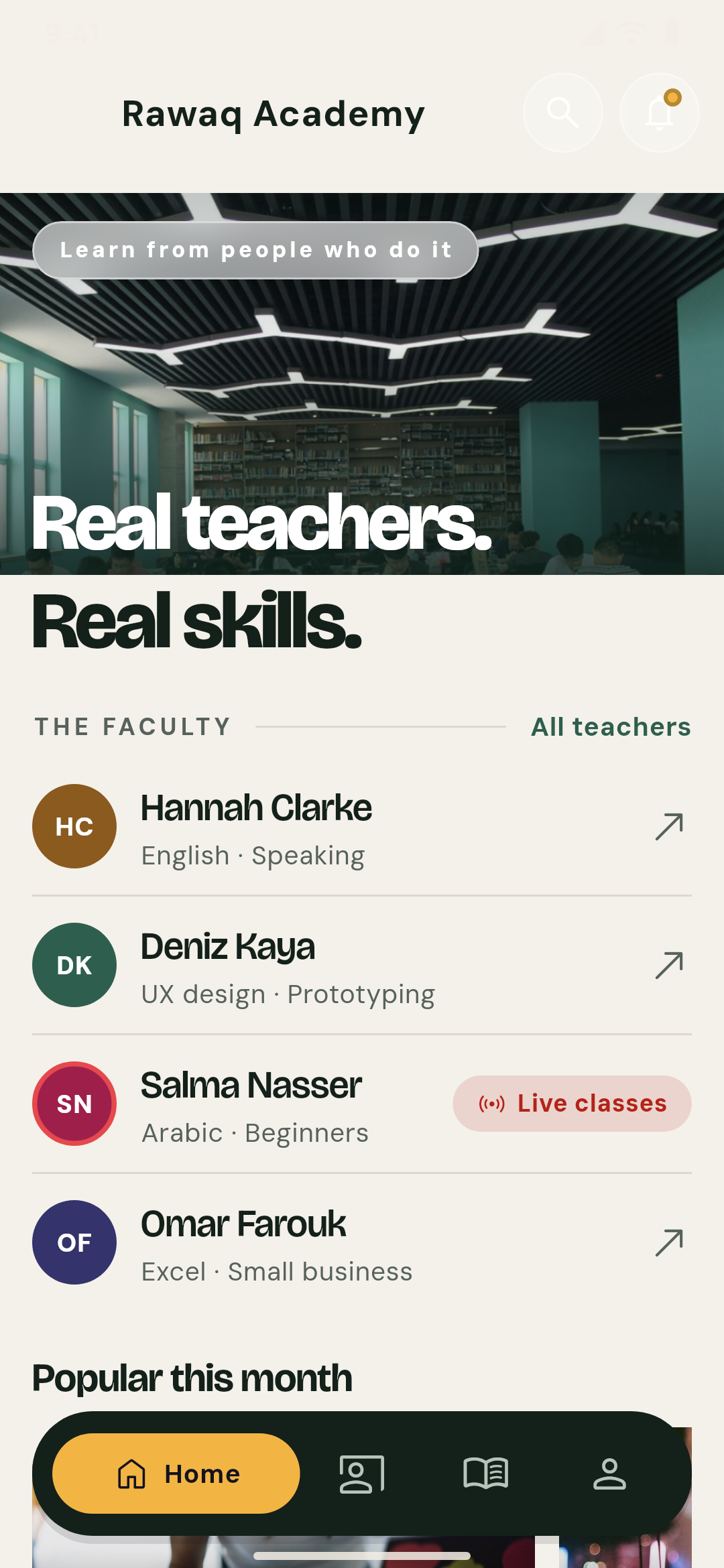
- Rawaq Academy, an academy with many teachers: the library's photo with "Real teachers. Real skills.", the teachers as an index with the one teaching live marked, and the month's popular courses as photo cards; Home, Teachers, My courses and Account.
- Sofra Eats, food delivery from many restaurants: tonight's dishes in a hero slider, the person's order on its way over its foot, the restaurants open near you as photo tiles, and a few dishes from the menus with the delivery fee.
- Zad, a multi-vendor app with restaurants and a supermarket: the address with the soonest delivery time and the search, this week's offers as green posters with their codes, the departments as arch photos and the places near you; Home, Shops, Cart, Orders and Account.
- Sahm Express, a delivery company: "Across the city, today." set large, the send form as a waybill with the services, their times and prices, and the person's shipment with its stages named on a line.
- Masar Rides, rides: a living map of the city with the person's ride drawn on it, the driver on the way, the car classes with their fares and "Where to?".
- Lamha Taxi, a live taxi app: the free taxis around the person on a map in two inks, the nearest one's minutes, where to, the classes and the airport's set price.
- Nakhla School, a school: the school gate's photo with the children to switch between and the family's greeting, the school's news running, today at school for the chosen child and the forms to sign.
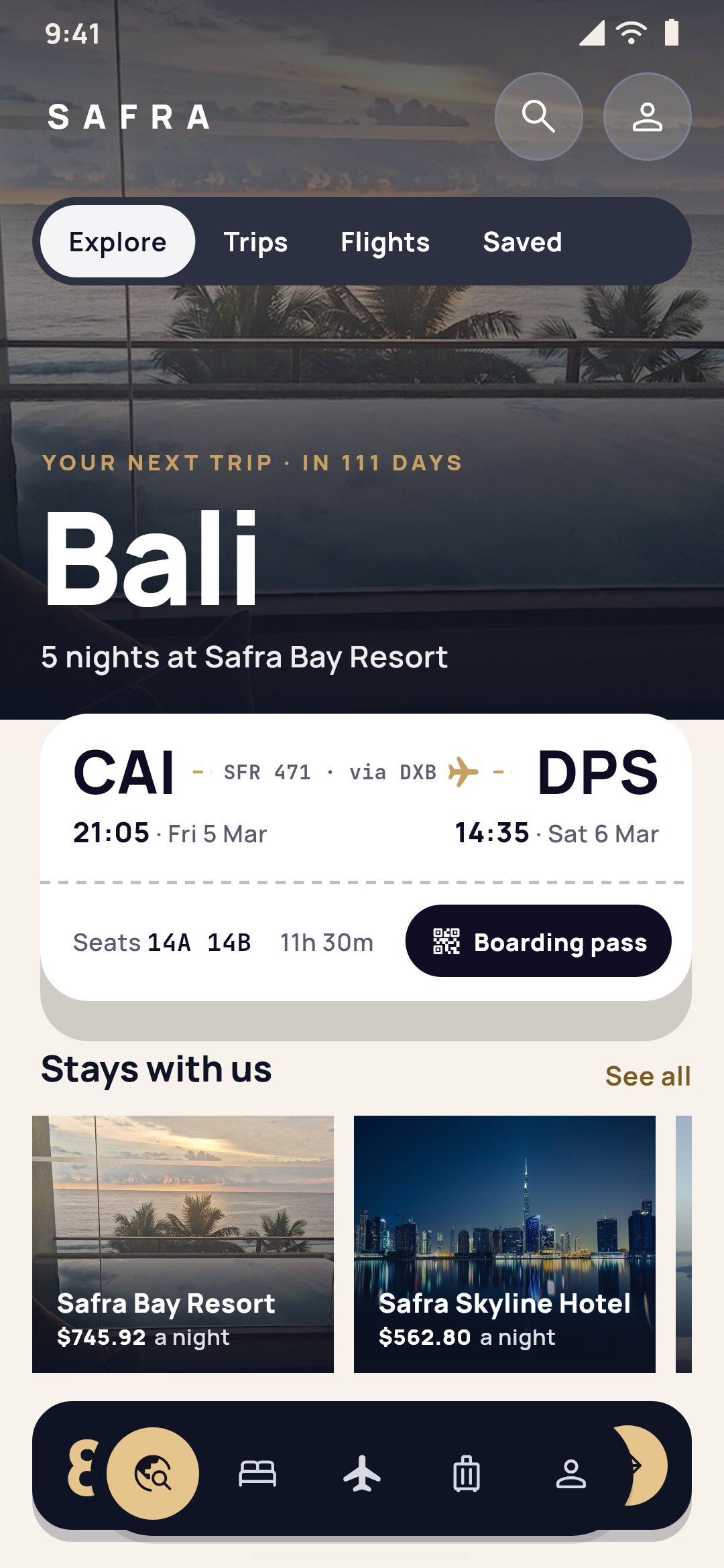
- Safra, a travel company: the resort's photo with Explore, Trips, Flights and Saved, the person's next trip as a boarding pass, the company's hotels with their price a night and its flights.
Each demo's earlier home is also a template for its kind of project, so any project can start a page like it.
Two looks for every demo
Every demo has two Signature looks. Look A is the demo itself; look B is another whole app, with its own home, pages, tabs, bar, colours, font, sign-in screen and account menu. Both are real templates: either one starts a real project.
- Sofra Eats: Editorial menu, and Bento table (the order in a gold ring, the cuisines as a photo bento, a turned band of dishes and a dark floating pill).
- Zad: Market arches, and Night aisle (the aisle's photo with the order as a slim pill and the minutes to the door, the departments as stories and the places as a deck).
- Sahm Express: Waybill, and Live route (the shipment drawn on a living map, a sheet with its minutes and stages, sending a parcel and the services as photos).
- Masar Rides: Living map, and Horizon (the city tilted to the horizon, "Where to?" large with the person's name, the driver's minutes and the fares).
- Lamha Taxi: Two-ink cab, and Glance radar (the free taxis' count large, a radar of the taxis around, the classes and a dock).
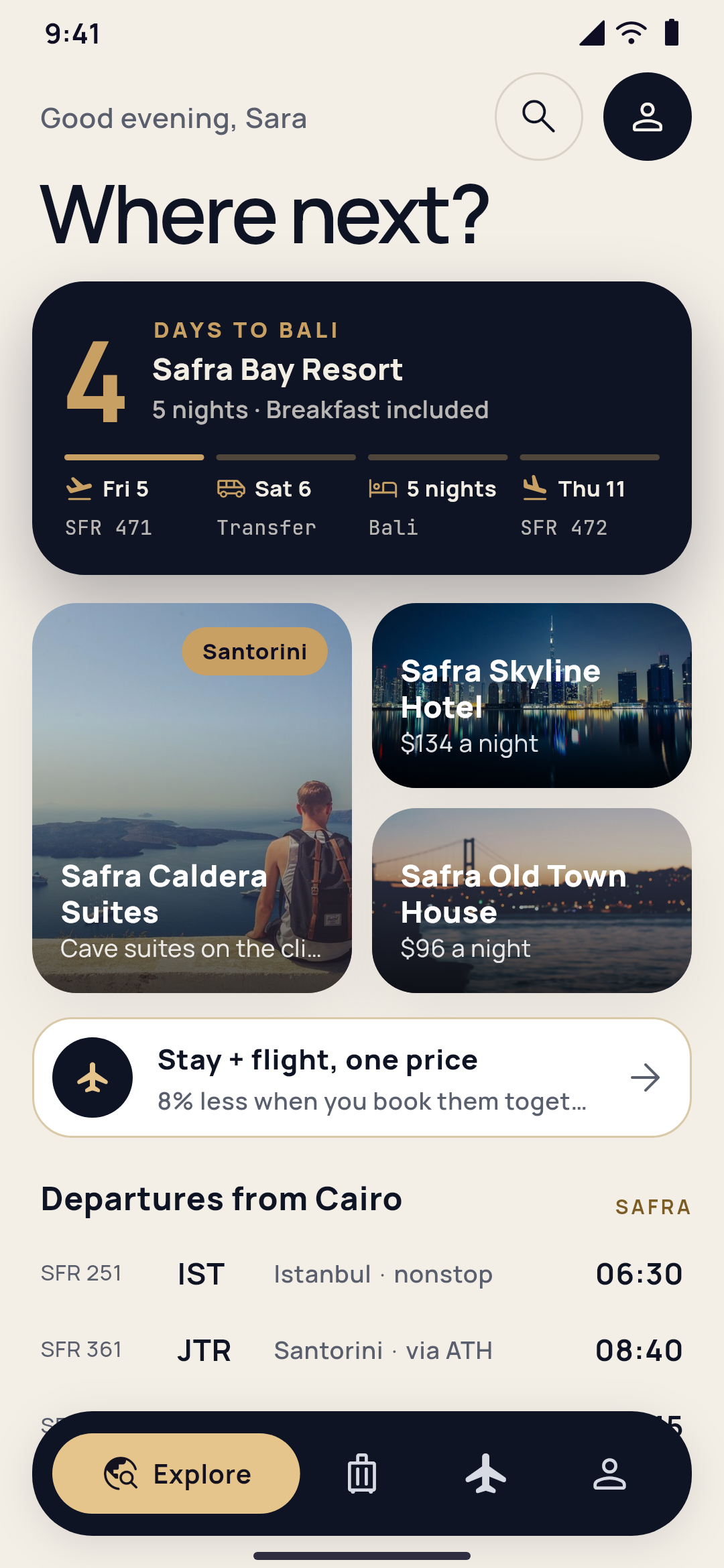
- Safra: Cover story, and Bento atlas (the next trip's days over its legs, the stays as a bento, a stay and a flight at one price, and the departures).
- Nakhla School: Morning edition, and Family passes (the chosen child's day as a pass, the school bus, the forms to sign and the news).
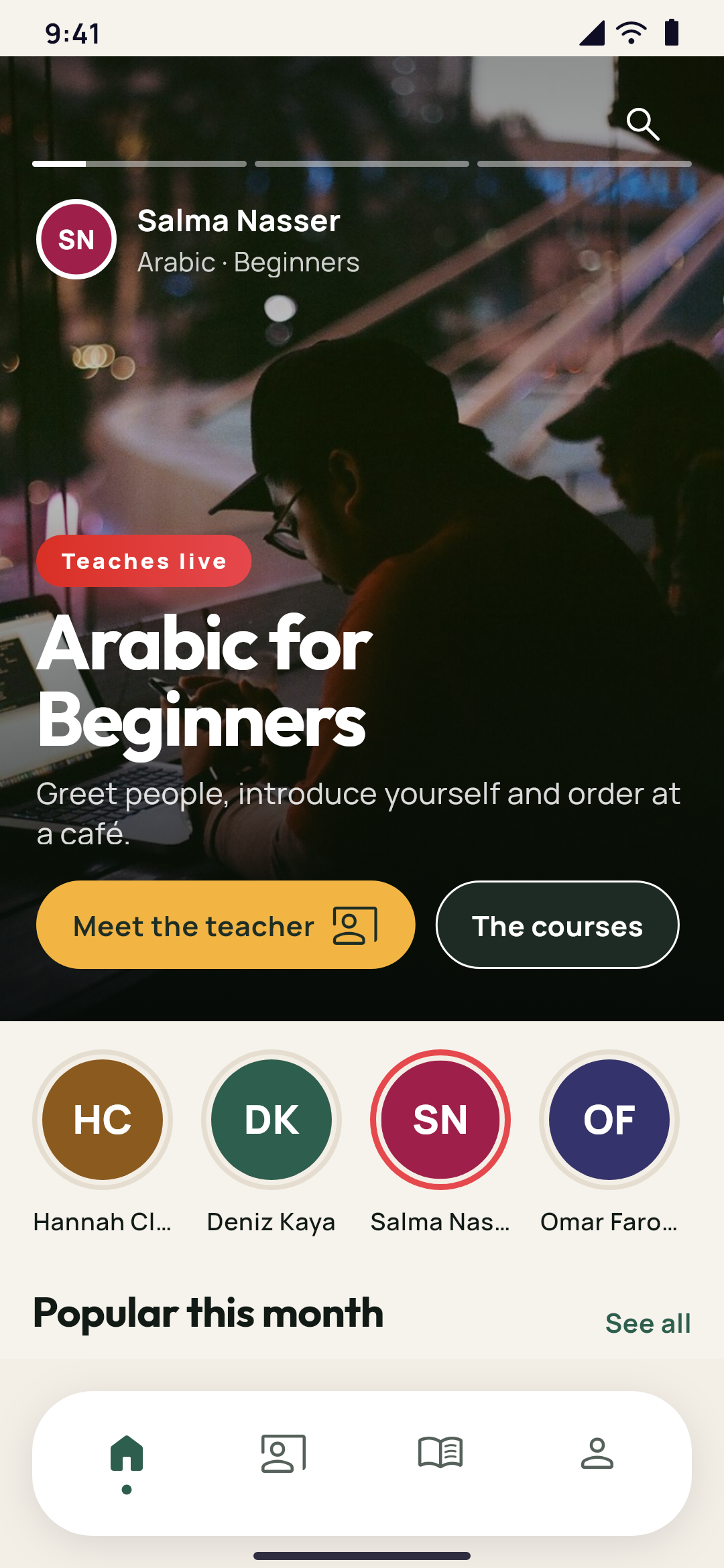
- Rawaq Academy: Faculty index, and On air (the teachers in a full-screen slider, the teachers in rings and the popular courses in a grid).
- Ufuq Academy: Night cinema, and Gold ring (the course in a gold ring, the streak with this week's days, the live class and the picked courses in a list, with a dock).
Starting from a demo
- Open Choose your app, or select New project in Studio. Studio at the top shows Studio's demos, dark with gold, apart from the App editor's. Each card shows look A in front, playing its loop, and look B behind it with 2 looks.
- Choose one to see its page: three of its screens, its pages, what comes with it (its courses, dishes, places, car types, classes or hotels), its languages, and Two looks to start from, each look's home with its name. Look A is chosen first; Choose this look takes the other.
- Select Start with this app, then Make it yours: your app's name, your logo, and your colour, taken from the logo. The phone beside it shows your app as you go, in the look you chose ("In the look: Look B · Horizon"). Select Create my app.
Your project opens in Studio's editor, made from that look: its pages, tabs, bar, sign-in screen, account menu, premium headers and the look of the app's own screens. Your first steps shows what's left: put in your own entries, your photos on the home page, and the stores. Tap anything in the app to change it. The demo's entries are marked From the demo in your lists, and Remove the demo's things takes them all away when yours are in.
Trying a demo live
On a demo's page the middle phone runs the real demo app, as a guest on its home, in your dashboard's language when the demo has it, light or dark as the page. On a computer it starts by itself; on a phone, select Try it live. Open the live app full size opens it on its own. Try it on your phone gives the demo's download, with a number and code to sign in.
Every card on the choosing page plays a short silent loop of its demo, in its look A, while you see it: its home, one other tab, and back. Phones set to reduce motion show the picture only.